
Definitive Guide to Event Project Management Tools (2026 Edition)
Event project management in 2026 is no longer about “keeping a checklist.” It is about controlling hundreds of moving pieces before one missed vendor deadline, unclear stakeholder approval, AV failure, registration bottleneck, or budget surprise turns a polished event into an expensive recovery operation. The right event PM tool stack helps teams manage scope, vendors, budgets, timelines, risk, sponsors, attendees, hybrid delivery, and post-event reporting with the same discipline covered in modern project management software feature analysis, project success research, and project monitoring terms.
1. What Event Project Management Tools Actually Need to Control in 2026
Event project management tools have to manage more than dates, tasks, and guest lists. A serious event plan now blends project initiation discipline, stakeholder engagement, procurement control, vendor management, and risk mitigation into one operating system. The mistake many teams make is choosing a tool because it has attractive dashboards, while the real event pressure lives in approvals, dependencies, change requests, run-of-show accuracy, budget exposure, and sponsor deliverables.
A useful event PM platform should give the team one source of truth for scope, timeline, responsibilities, files, budget, dependencies, and live issue escalation. That matters because event work is loaded with invisible failure points: the venue confirms a room layout but catering plans around the old count; marketing updates the agenda but registration emails still show outdated session names; a sponsor expects booth placement that operations never approved; finance sees the invoice after the commitment has already been made. These are classic control failures, and they look very similar to the breakdowns explained in project failure root-cause analysis, project reporting best practices, and communication terminology for PMs.
The best event PM tools help teams answer six questions quickly: what must be done, who owns it, when it is due, what blocks it, what changed, and what decision is needed. That sounds simple, but it separates professional event delivery from “everyone has their own spreadsheet.” A conference, fundraising gala, trade show, product launch, corporate retreat, government forum, academic summit, or hybrid training event needs the same project logic found in resource allocation software, issue tracking systems, and earned value management concepts, even when the final output looks more creative than technical.
The strongest 2026 tool stack usually includes a planning tool, registration platform, event app, vendor/procurement tracker, budgeting system, file repository, automation layer, reporting dashboard, and communication hub. Smaller teams may combine these inside one platform, while larger organizations often integrate multiple systems using ideas similar to project management APIs and integrations, AI automation trends, and future project management software predictions. The goal is not to collect software. The goal is to remove ambiguity before the event date punishes it.
| Tool Capability | What “Good” Looks Like | Event Risk It Reduces | Best Signals / Features | Who Must Use It |
|---|---|---|---|---|
| Event scope control | Every session, deliverable, audience, sponsor promise, venue requirement, and content asset is documented before execution begins. | Silent scope creep | Scope baseline, approval log, change request form | Event lead, sponsor, client owner |
| Master timeline | Milestones, dependencies, approval windows, print deadlines, travel cutoffs, and rehearsal dates live in one timeline. | Late surprises | Gantt view, calendar sync, dependency alerts | Event PM, operations, marketing |
| Run-of-show builder | The live event schedule includes cues, owners, speakers, AV notes, transitions, backup plans, and escalation contacts. | Day-of confusion | Minute-by-minute agenda, owner fields, exportable show flow | Producer, AV, floor manager |
| Vendor tracker | Each supplier has contract status, deliverables, payment terms, contact owner, deadlines, and risk notes. | Vendor misses | Vendor dashboard, SOW storage, SLA notes | Procurement, operations, finance |
| Budget control | Planned, committed, invoiced, paid, and forecast costs are separated clearly so the team sees exposure early. | Budget blowouts | Budget baseline, variance tracking, invoice fields | Finance, event lead, sponsor |
| Registration workflow | Attendee registration, waitlists, ticket types, badge data, dietary needs, and check-in logic connect to operations. | Attendee friction | Registration forms, attendee segments, check-in reports | Guest experience, marketing, ops |
| Sponsor deliverables | Logo placement, booth size, speaking slots, email mentions, signage, and reporting obligations are tracked by package. | Sponsor dissatisfaction | Sponsor matrix, asset checklist, proof folder | Partnerships, marketing, sales |
| Content approvals | Slides, scripts, signage, landing pages, speaker bios, email campaigns, and printed materials have clear review gates. | Brand/legal mistakes | Approval status, version history, reviewer assignments | Marketing, legal, speakers |
| Speaker management | Speaker confirmations, bios, headshots, slide deadlines, travel needs, prep calls, and release forms are organized. | Session gaps | Speaker portal, document requests, prep checklist | Programming team, event PM |
| Venue readiness | Room layouts, load-in windows, safety rules, insurance, Wi-Fi, signage paths, and staff access are tracked together. | Operational clashes | Venue checklist, floorplan uploads, access notes | Venue manager, ops, security |
| Hybrid event support | Streaming, platform access, remote speaker backup, recording, captions, chat moderation, and technical rehearsal are planned. | Digital failure | AV checklist, livestream roles, rehearsal tasks | AV, digital producer, speakers |
| Risk register | Weather, vendor, venue, speaker, attendee, security, compliance, budget, and technology risks have owners and responses. | Unowned risk | Risk score, mitigation owner, contingency plan | Event PM, sponsor, operations |
| Issue escalation | Problems are logged, prioritized, assigned, tracked, and closed before they become hallway emergencies. | Firefighting culture | Issue board, severity tags, escalation SLA | All workstream leads |
| Resource planning | Staff, volunteers, contractors, room captains, registration desk coverage, and floaters are matched to event demand. | Understaffing | Shift planner, role matrix, capacity view | Operations, HR, volunteer lead |
| Communication hub | Updates are segmented by stakeholder group so executives, vendors, speakers, and staff receive relevant information. | Message overload | Update templates, stakeholder lists, activity feed | Comms lead, event PM |
| File governance | Final versions are obvious, old drafts are controlled, and nobody uses last week’s floorplan by accident. | Version chaos | Folder rules, permissions, version history | Marketing, ops, AV, vendors |
| Compliance tracking | Permits, insurance, accessibility, data privacy, safety, food handling, and venue regulations are visible early. | Legal exposure | Compliance checklist, deadline alerts, proof uploads | Legal, venue, event PM |
| Procurement workflow | Quotes, bids, approvals, contracts, purchase orders, and supplier comparisons follow a traceable path. | Weak buying control | RFP tracker, approval workflow, contract archive | Procurement, finance, ops |
| Attendee experience | Arrival, check-in, session movement, food, signage, app updates, feedback, and support requests are planned as one journey. | Guest frustration | Journey map, support queue, feedback forms | Experience lead, operations |
| Marketing coordination | Email, social, landing pages, paid campaigns, speaker promotion, and sponsor mentions align with registration goals. | Low attendance | Campaign calendar, UTM fields, asset tracker | Marketing, partnerships, event lead |
| Automation rules | Reminder emails, task alerts, approval nudges, registration triggers, and post-event surveys run without manual chasing. | Manual follow-up gaps | Conditional workflows, templates, integrations | Event PM, marketing ops |
| Reporting dashboard | Status, budget, risk, attendance, sponsor readiness, vendor readiness, and open issues are visible without meeting overload. | Executive blind spots | Live dashboard, traffic-light status, exportable reports | Executives, PMO, event sponsor |
| Post-event analysis | Attendance, engagement, budget variance, sponsor value, feedback, lead capture, and lessons learned are reviewed fast. | Lost learning | Survey analysis, KPI dashboard, retrospective notes | Leadership, marketing, PMO |
| Mobile access | Day-of teams can view schedules, tasks, contacts, maps, and issue updates without opening a laptop. | Slow response | Mobile app, offline access, push alerts | Floor team, vendors, volunteers |
| Security controls | Sensitive attendee, sponsor, budget, and contract data has role-based access and controlled sharing. | Data leakage | Permissions, audit logs, SSO options | IT, legal, event PM |
| Integration quality | Registration, CRM, finance, calendar, email, forms, and analytics systems connect without duplicate entry. | Data mismatch | API support, native integrations, sync logs | IT, marketing ops, finance |
| Template library | The team reuses proven checklists for conferences, webinars, launches, fundraisers, retreats, and trade shows. | Reinventing work | Reusable playbooks, checklist cloning, standard fields | PMO, event team, operations |
| Decision log | Major choices about venue, budget, agenda, sponsors, layout, speakers, and vendors are recorded with owners and dates. | Approval disputes | Decision register, meeting notes, approval trail | Sponsor, event PM, executives |
2. The Core Categories of Event Project Management Tools
The first category is general project management software. These tools handle task boards, timelines, dependencies, assignments, milestones, approvals, and status reporting. They are useful when your event has multiple workstreams: venue, registration, sponsors, programming, marketing, operations, AV, finance, hospitality, travel, and post-event analysis. For event teams comparing platforms, the best starting point is to understand project management software features, Kanban software tools, agile project management tools, waterfall project management software, and hybrid project management trends.
The second category is event registration and attendee management software. These tools manage event pages, ticketing, RSVP flows, attendee segmentation, badges, waitlists, check-in, dietary requirements, session selection, and attendance reporting. The danger here is treating registration as a marketing function only. Registration data affects room capacity, catering, staffing, printed materials, sponsor value, lead capture, and budget forecasts. That is why event PMs need to understand resource allocation, project budgeting terms, cost management terms, and project financial management before choosing a registration platform.
The third category is event experience software: mobile apps, agenda builders, networking tools, attendee messaging, live polling, Q&A, gamification, sponsor booths, session feedback, and hybrid engagement platforms. These tools are valuable when they improve the attendee journey, but they become expensive decoration when they are disconnected from the project plan. A beautiful app cannot save a weak agenda, unclear speaker prep, bad room flow, or missing escalation plan. Event PMs should connect experience tools to stakeholder terms, quality management terms, total quality management, and team communication techniques.
The fourth category is procurement, vendor, and contract management software. Events are vendor-heavy by nature: venue, catering, production, AV, security, décor, staging, furniture, travel, signage, printing, transportation, translators, photographers, livestream crews, and cleaning teams. Every vendor adds a promise, deadline, invoice, risk, dependency, and possible failure point. The stronger your vendor control, the fewer “we thought someone else had it” moments you face. This is where procurement terminology, contract management terminology, supplier management terms, and procurement management tools become directly practical.
The fifth category is reporting and portfolio visibility. One event may be manageable in a spreadsheet. Ten events across regions, departments, sponsors, budgets, venues, and campaigns require portfolio discipline. Leadership needs to know which events are at risk, which budgets are drifting, which sponsors are under-served, which teams are overloaded, and which event formats produce measurable business value. That connects event PM to project portfolio management trends, PPM career skills, PMO success predictions, and project governance trends.
3. How to Choose the Right Event PM Tool Stack Without Buying Chaos
Start with your event risk profile, not the software demo. A 50-person executive roundtable, 1,500-person industry conference, multi-city roadshow, academic symposium, fundraiser, virtual summit, government procurement forum, construction stakeholder briefing, or healthcare training event will each stress different parts of the tool stack. A small internal retreat may need strong scheduling, travel, and budget control. A trade show needs sponsor deliverables, booth logistics, lead capture, and exhibitor communication. A public-sector event may need documentation, approvals, procurement records, and accessibility compliance similar to the rigor discussed in government project manager career guidance, ISO standards for PMs, and project governance best practices.
Then map the workstreams. Most event teams need workstreams for venue, agenda, speakers, attendees, sponsors, marketing, vendors, budget, risk, production, staffing, compliance, and reporting. Each workstream needs owners, tasks, deadlines, files, decision points, dependencies, and escalation rules. If a tool cannot show dependencies clearly, it will hide the real danger. For example, signage cannot be finalized until sponsors approve logos, the floorplan is locked, session rooms are assigned, and the agenda is final. This is why teams should understand Gantt chart terms, critical path method, project scheduling terms, and schedule compression concepts.
Next, test how the tool handles change. Events change constantly: attendance rises, a keynote cancels, the client changes branding, a vendor misses a cutoff, security requirements increase, weather affects outdoor plans, or a sponsor wants extra visibility. Strong tools make change visible. Weak tools bury change inside chat threads. The tool should show what changed, who approved it, what it affects, and whether it changes budget, schedule, risk, or scope. That same thinking appears in project execution terms, monitoring and control concepts, risk register guidance, and issue tracking software.
You also need to evaluate integration depth. If your registration tool, email platform, CRM, finance system, event app, analytics dashboard, and task manager do not talk to each other, your team becomes the integration layer. That means manual exports, duplicate records, stale reports, inconsistent attendee numbers, and late invoice visibility. A modern event PM stack should reduce manual reconciliation. The safest approach is to plan integrations from the start using lessons from project management APIs, automation adoption in project management, machine learning in estimation and scheduling, and AI project management innovations.
Finally, choose tools that your team will actually maintain under pressure. A complicated system that collapses two weeks before the event is worse than a simpler system with disciplined ownership. The right platform should make updates fast, status obvious, approvals traceable, and day-of execution practical. Tools should support the way event work really happens: fast decisions, many external parties, high emotion, fixed deadlines, visible consequences, and very little tolerance for confusion. That is the same operational maturity expected in IT project management, construction project management, healthcare project management, and international project management.
4. The Best Event PM Tool Features for Conferences, Launches, Trade Shows, and Hybrid Events
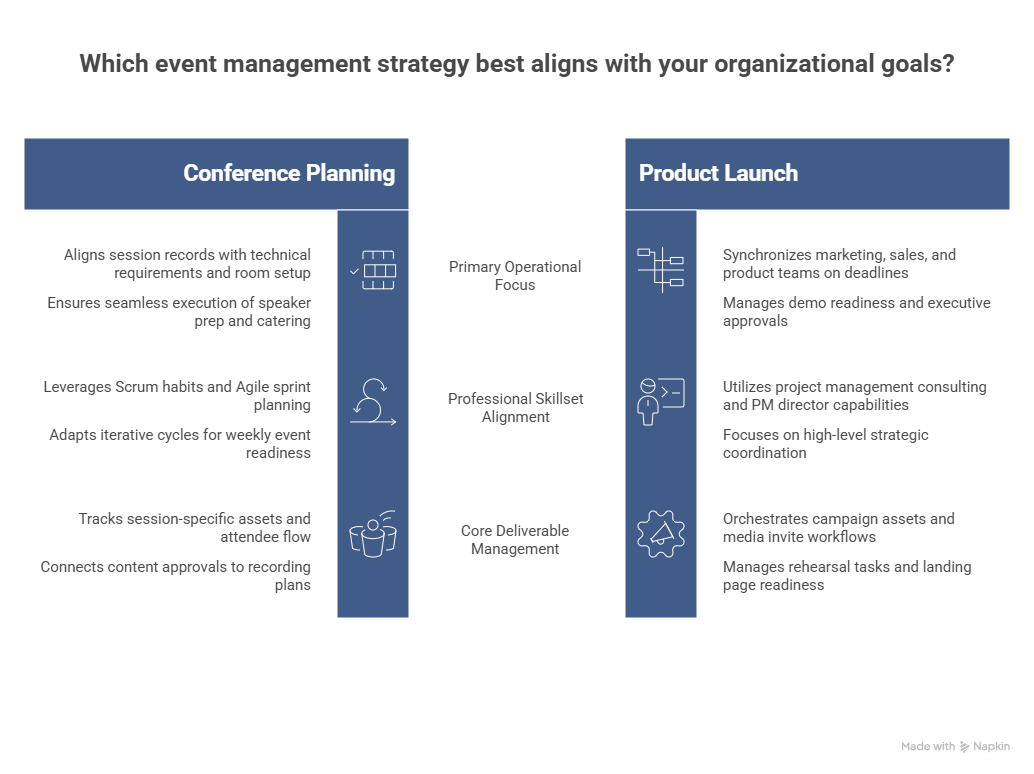
For conferences, the most valuable feature is agenda-to-operations alignment. A conference agenda is not just a list of sessions. It drives speaker prep, room setup, AV requirements, signage, catering breaks, sponsor promises, attendee flow, content approvals, recording plans, moderator scripts, and post-event reporting. A strong tool should connect session records to owners, assets, deadlines, technical requirements, capacity, and risks. Teams that already understand Scrum terms, Agile estimation, sprint planning, and Agile metrics can adapt those habits into weekly event readiness cycles.
For product launches, the best feature is cross-functional dependency tracking. Launch events bring marketing, sales, product, PR, customer success, executives, creative, legal, agencies, venue teams, production crews, and sometimes partners into the same deadline. The tool should show campaign assets, demo readiness, speaker scripts, media invites, landing pages, rehearsal tasks, customer lists, and executive approvals in one coordinated plan. This kind of launch discipline sits close to product owner career skills, project management consulting skills, PM director capabilities, and VP-level PM career growth.
For trade shows and expos, sponsor and exhibitor management is the pressure point. Each booth, package, logo, floorplan placement, lead capture rule, signage asset, speaking opportunity, payment milestone, and post-event report must be tracked with commercial precision. The tool needs a sponsor deliverables matrix, asset upload workflow, contract visibility, invoice status, and proof-of-delivery folder. Without that, the event team spends the final week chasing logos, explaining booth rules, fixing floorplan disputes, and calming sponsors. Strong trade show delivery benefits from contract management terms, procurement tools, stakeholder engagement, and project reporting practices.
For hybrid events, the essential feature is technical rehearsal control. Hybrid events fail when digital delivery is treated as an add-on instead of a parallel production stream. The tool should track livestream links, backup internet, speaker audio/video checks, slide formats, captioning, recording permissions, chat moderation, platform access, remote speaker contacts, and escalation paths. Hybrid work also needs clean role separation: one person cannot manage the room, stream, speakers, chat, and emergency issues at the same time. This connects directly to remote and virtual project management, future PM competencies, automation in PM careers, and digital transformation in PMOs.
For fundraising events, galas, and community events, donor or attendee journey tracking matters most. These events are not judged only by operational smoothness. They are judged by trust, emotion, follow-up, giving behavior, sponsor care, and relationship value. Your tool should connect guest lists, table assignments, pledge workflows, sponsor recognition, VIP handling, auction logistics, thank-you messages, and post-event reporting. A team that only tracks tasks may miss the relationship layer. That is why event PMs should combine communication leadership, team building terminology, conflict resolution terms, and project closure concepts.
5. Building a Practical Event PM Workflow From Planning to Post-Event Reporting
The workflow should begin with an event charter. This should define the event purpose, target audience, success metrics, budget range, stakeholders, constraints, decision authority, major risks, and non-negotiables. Without this foundation, tools become a place to store confusion. The charter prevents the common event trap where everyone wants a different outcome: marketing wants leads, leadership wants prestige, sponsors want visibility, attendees want value, finance wants cost control, and operations wants a realistic plan. Good charter discipline pulls from project initiation, project success factors, project governance, and project manager career roadmaps.
After the charter, build the work breakdown. Break the event into workstreams, then into deliverables, then into tasks. Venue is not a task. Venue includes contract, insurance, room layout, load-in, Wi-Fi, furniture, signage permissions, safety rules, floorplan, catering coordination, accessibility, parking, storage, and on-site contacts. Speaker management is not a task. It includes invitation, confirmation, bio, headshot, topic, slides, rehearsal, travel, release form, arrival time, green room, and thank-you follow-up. This is the level of detail that prevents rework, and it aligns naturally with work breakdown thinking, resource allocation terms, schedule management, and risk identification.
Then create a readiness cadence. Weekly status meetings are not enough when they only collect updates. A real cadence reviews milestones, overdue tasks, risk changes, budget movement, sponsor deliverables, vendor readiness, decisions needed, and upcoming deadlines. As the event date approaches, the cadence should tighten: monthly planning may become weekly, then twice-weekly, then daily standups during final production. The goal is to catch weak signals early. That rhythm is similar to the operating discipline behind Agile project management, Scrum master career skills, Agile coach development, and Agile consulting career paths.
The run-of-show should be treated as a controlled project artifact, not a loose document. Every cue should have a time, owner, location, dependency, communication channel, and fallback plan where needed. The AV team, venue, emcee, speakers, registration desk, security, catering, floor managers, and event lead should all understand the same version. The final run-of-show should be locked after rehearsal, with a change-control process for anything that affects timing, safety, speaker movement, or production. This brings together project reporting, communication terms, quality management, and monitoring and control.
Post-event reporting should happen while the evidence is still fresh. Capture attendance, no-show rate, session engagement, feedback, sponsor deliverables, budget variance, lead quality, vendor performance, issue log, team lessons, and recommendations for the next event. The most mature teams turn this into a reusable event playbook. They know which vendors performed, which milestones were too late, which approval steps slowed the team, which budget categories drifted, and which attendee experience choices worked. This closes the loop between event execution and organizational learning, which is the same habit seen in project closure terms, portfolio management, PMO success trends, and project management market outlook.
6. FAQs About Event Project Management Tools
-
The most important feature is dependency visibility. Event failures rarely come from one isolated task. They come from linked tasks that nobody saw clearly: the agenda affects room setup, room setup affects AV, AV affects rehearsal, rehearsal affects speaker confidence, and speaker timing affects the entire run-of-show. A tool with strong dependencies, owner fields, due dates, status dashboards, and escalation rules gives the event PM control before the deadline becomes painful. This is why teams should study Gantt charts, critical path method, scheduling terms, and monitoring terms.
-
Small teams need control, even when they do not need enterprise software. A lightweight stack can work if it covers tasks, timeline, budget, vendors, registration, files, risk, and day-of communication. The danger is running a serious event across scattered spreadsheets, email threads, chat messages, and memory. Small teams should start with reusable templates, clear ownership, and a simple dashboard before investing in heavier systems. That approach matches the practical discipline behind small business project management software, team building terms, communication leadership, and project execution terms.
-
Vendor management should include contracts, deliverables, payment terms, deadlines, contacts, insurance, setup windows, approval requirements, risk notes, and performance records. The tool should make it obvious which vendors are confirmed, which are waiting on approvals, which have open invoices, and which deliverables are at risk. Events depend heavily on external execution, so vendor ambiguity becomes operational risk fast. Event teams should connect their tool setup to vendor management terminology, procurement terms, contract management, and RFP/RFQ/RFI basics.
-
Separate planned budget, approved budget, committed cost, invoiced cost, paid cost, and forecast final cost. Many event budgets look healthy because the team tracks only paid invoices, while the real exposure sits in verbal commitments, unsigned quotes, add-ons, overtime, rush fees, and sponsor-related extras. A strong tool should flag budget variance early and tie costs to owners, vendors, and approvals. This discipline is supported by budgeting terms, cost management terms, financial management terminology, and earned value management.
-
AI and automation can help with reminder workflows, registration segmentation, task summaries, risk prompts, meeting notes, attendee questions, sponsor reporting drafts, survey analysis, and schedule optimization. The practical value comes from reducing manual chasing and surfacing weak signals early. Event teams should use automation carefully because a bad workflow can send the wrong reminder, expose outdated information, or hide accountability. The strongest approach is to pair automation with human approval gates, using ideas from AI automation adoption, AI project management forecasts, future software trends, and automation career impacts.
-
A useful dashboard should show milestone status, overdue tasks, budget variance, vendor readiness, sponsor deliverables, registration numbers, open risks, open issues, approval blockers, staffing readiness, and upcoming critical deadlines. Executives need a high-level view, but workstream owners need enough detail to act. The best dashboards prevent status theater by showing evidence, owners, dates, and decisions needed. This turns reporting into control instead of decoration. Event PMs can strengthen dashboard design with project reporting best practices, risk register guidance, issue tracking software, and portfolio management trends.
-
They preserve the evidence needed to improve the next event. Without structured data, teams remember only the loudest problems: a late speaker, a registration line, a catering issue, or a sponsor complaint. A good tool captures the full pattern: task delays, budget drift, vendor performance, attendance quality, engagement, feedback, risk response, and team workload. That turns every event into a stronger playbook. Mature teams connect post-event learning to project closure, quality management, project success analysis, and PMO improvement trends.
