
Top PM Software Solutions for Educational Institutions
Educational institutions do not suffer from a lack of work. They suffer from fragmented ownership, buried approvals, grant deadlines, scattered faculty communication, facilities backlogs, IT tickets, accreditation evidence, enrollment campaigns, curriculum updates, and student-success initiatives living in too many tools. The right project management platform gives schools, colleges, and universities one disciplined operating layer for planning, tracking, escalation, documentation, and accountability across academic and administrative work. That is why the best 2026 solution should be judged through project scheduling, resource allocation, project governance, and stakeholder engagement, not feature lists alone.

1. What Educational Institutions Actually Need From PM Software
Project management software for education has to support a strange mix of work. A university may be running a campus renovation, grant-funded research project, LMS migration, student retention initiative, curriculum redesign, accreditation evidence cycle, alumni campaign, admissions funnel, cybersecurity upgrade, faculty hiring process, and facilities maintenance rollout at the same time. Those projects have different owners, budgets, privacy needs, academic calendars, and approval paths. The strongest platforms help institutions standardize intake, assign ownership, show timeline risk, document decisions, track dependencies, and report progress without forcing every department into the same rigid workflow. That is the same operating logic behind PMO success, project monitoring and control, project execution, and project reporting.
The buying risk is simple: schools often choose software that looks friendly in a demo but collapses under real institutional complexity. A department chair needs quick task visibility. A grants office needs compliance evidence. Facilities needs dependencies and vendor dates. IT needs backlog control. Student services needs case-style coordination. Leadership needs portfolio-level visibility. Finance needs budget accountability. Legal and data teams need privacy discipline. The U.S. Department of Education administers and enforces student privacy laws such as FERPA and PPRA, so any education technology purchase that touches student-related information should be reviewed with privacy, access control, and record governance in mind. This is where risk registers, procurement terms, contract management, and vendor management become practical buying tools.
| Capability | What “Good” Looks Like | Institutional Impact | Signals / Tools | Who You Align With |
|---|---|---|---|---|
| Project intake | Departments submit requests through standard forms with goals, owners, deadline, budget, and impact. | Fewer invisible projects | Forms, request queues, intake routing | PMO, provost office, operations |
| Academic calendar fit | Projects can be planned around semesters, terms, holidays, exam windows, enrollment cycles, and board dates. | Realistic scheduling | Calendar views, milestones, dependencies | Registrar, academic affairs |
| Grant tracking | Deadlines, deliverables, budgets, evidence, approvals, and reporting obligations stay connected. | Cleaner compliance | Grant boards, document links, reminders | Research office, finance |
| Accreditation evidence | Evidence owners, due dates, document links, review status, and gaps are visible. | Less last-minute panic | Evidence tracker, audit trail | Accreditation lead, faculty committees |
| Facilities projects | Work orders, vendors, inspections, procurement dates, dependencies, and budget status can be tracked. | Fewer campus delays | Gantt, vendor tasks, status dashboards | Facilities, procurement |
| IT initiatives | LMS upgrades, cybersecurity projects, device rollouts, integrations, and helpdesk dependencies are managed clearly. | Lower disruption risk | Backlogs, sprint boards, change logs | IT, cybersecurity, helpdesk |
| Student-success work | Retention, advising, tutoring, outreach, and intervention initiatives have owners, metrics, and follow-through. | Better student support | Dashboards, task ownership, reports | Student affairs, advising |
| Faculty collaboration | Committees can manage curriculum, assessment, research, peer review, and program updates without email chaos. | Cleaner committee work | Shared workspaces, docs, comments | Faculty, department chairs |
| Role permissions | Students, faculty, staff, vendors, and leaders see only the work and data they should access. | Lower privacy exposure | Permission groups, guest access controls | IT, legal, HR |
| Portfolio visibility | Leadership can see all strategic projects, owners, risks, progress, and stalled decisions. | Better executive control | Portfolio dashboards, health scores | President, dean, PMO |
| Template library | Repeatable projects such as accreditation, events, course launches, audits, and campaigns have reusable templates. | Less reinvention | Project templates, checklist libraries | Operations, academic affairs |
| Document control | Files, approvals, notes, and evidence stay connected to the task or milestone they support. | Faster audits | File links, version references, approvals | Compliance, records office |
| Budget tracking | Teams can connect project progress to budget lines, vendor costs, grant spend, or department allocation. | Less budget drift | Budget fields, reports, integrations | Finance, grants office |
| Approvals | Curriculum, procurement, policy, communications, grants, and facilities approvals follow visible workflows. | Fewer stalled decisions | Approval routing, timestamps, comments | Deans, legal, finance |
| Reporting | Reports show late work, blocked projects, capacity strain, decision delays, and project health. | Earlier intervention | Dashboards, rollups, exports | Executives, PMO |
| Integration fit | The platform works with Microsoft 365, Google Workspace, LMS, SIS, Slack, Teams, email, and file storage. | Less duplicate entry | Native integrations, APIs, connectors | IT, enterprise architecture |
| Mobile usability | Staff can update tasks, upload evidence, receive alerts, and check status from phones or tablets. | Higher adoption | Mobile app, notifications, offline support | Field staff, student services |
| AI assistance | AI summarizes status, drafts updates, finds risks, creates tasks, and reduces admin without hiding accountability. | Less admin drag | AI summaries, automations, smart fields | PMO, IT, department heads |
| Data privacy | Student-related data, research files, HR records, and sensitive notes are governed carefully. | Lower compliance risk | SSO, MFA, audit logs, retention controls | Legal, IT security |
| Change management | Faculty and staff receive role-based training, launch support, and clear workflow expectations. | Better adoption | Training plan, champions, office hours | HR, PMO, department leads |
| Governance cadence | Strategic projects have review meetings, escalation paths, risk rules, and decision owners. | Fewer abandoned initiatives | Steering dashboards, RACI, meeting rhythm | Executives, PMO |
| Procurement support | Software can track RFPs, vendor milestones, evaluation committees, approvals, and contract dates. | Cleaner buying cycles | Vendor board, scoring matrix, reminders | Procurement, legal |
| Event planning | Admissions events, graduations, orientations, board meetings, and donor events can be planned from templates. | Less event chaos | Event task lists, owners, dependencies | Admissions, advancement |
| Research coordination | Research teams can track milestones, approvals, submissions, collaborators, and funding requirements. | Stronger grant delivery | Milestone boards, document tracking | Faculty, research office |
| Student projects | Simple boards or workspaces help students manage capstones, clubs, group projects, and deadlines. | Better learning structure | Kanban boards, calendars, task lists | Faculty, students |
| Scalability | The platform can grow from one department to institution-wide usage without workflow collapse. | Lower replatform risk | Admin console, enterprise controls | IT, leadership |
| Cost clarity | Licensing, guest users, storage, automations, integrations, implementation, and support are visible before purchase. | Fewer budget surprises | Pricing model, renewal terms, add-ons | Finance, procurement |
| Success metrics | The rollout measures adoption, project cycle time, late tasks, approval speed, and stakeholder satisfaction. | Proof of value | KPI dashboard, baseline report | PMO, sponsors |
2. Top PM Software Solutions for Educational Institutions: 2026 Rankings
1. Smartsheet — best overall for higher education operations and portfolio visibility. Smartsheet is the strongest fit for institutions that need flexible project sheets, dashboards, forms, approval workflows, reporting, and cross-department coordination without forcing every team into software-development language. Its higher education page highlights cross-department collaboration, strategic planning, academic workflows, research projects, student success, administrative work, and real-time visibility for leaders. Smartsheet is especially useful for colleges managing accreditation, grants, facilities, strategic plans, admissions initiatives, and executive reporting. It pairs naturally with APMIC guidance on project portfolio management, project reporting, stakeholder engagement, and project governance.
2. monday.com — best for institution-wide workflow visibility and administrative teams. monday.com is a strong choice for schools that want a visual work operating system for projects, processes, approvals, campaigns, and department coordination. Its education software guide frames PM tools around academic planning, curriculum redesign, fundraising, admissions, and administrative workflows, while monday.com’s project management page emphasizes communication, approvals, feedback, files, monitoring, and project control in one place. This makes monday.com a serious option for admissions, advancement, HR, marketing, operations, and cross-functional initiatives. It supports the same discipline behind project management software features, AI and automation adoption, project success factors, and future project management software.
3. Microsoft Planner — best for Microsoft 365 schools and universities. Microsoft Planner is a practical option for institutions already standardized on Microsoft 365, Teams, Outlook, SharePoint, and Entra identity controls. Microsoft describes Planner as task and project management software for managing tasks, improving team collaboration, streamlining projects, planning work, gaining visibility, sharing insights, and running initiatives from simple projects to larger efforts. This choice makes sense when adoption matters more than introducing another separate login. It is valuable for schools that already depend on Microsoft Teams for committees, staff collaboration, IT planning, and administrative work. It connects well with project initiation, project scheduling, Gantt chart planning, and critical path methods.
4. Asana — best for academic departments and collaborative administrative work. Asana is useful when the core problem is task clarity across committees, departments, campaigns, academic initiatives, and distributed teams. Asana positions its work management platform around organizing work, keeping distributed teams focused, managing projects and tasks, and using AI to support team execution. For education, Asana works best when teams need simple ownership, deadlines, project views, status updates, and accountability across many contributors. It fits curriculum projects, student-affairs initiatives, HR campaigns, communications calendars, and internal process improvement. It aligns with APMIC resources on project communication, PM leadership, team building, and conflict resolution.
5. ClickUp — best all-in-one platform for education teams that want tasks, docs, goals, and coursework workflows together. ClickUp has dedicated education and student pages that present the platform as a way to manage academic and administrative resources, coursework, schedules, assignments, and education work in one place. It is a strong fit for institutions that want docs, tasks, dashboards, goals, automations, whiteboards, and project views under one flexible system. The risk is configuration sprawl, so schools should define naming rules, templates, workspace structure, and permissions early. ClickUp works best with disciplined project execution terms, Agile terminology, agile estimation, and project monitoring.
6. Wrike — best for marketing, creative, enrollment, and multi-stakeholder education projects. Wrike has an education page focused on academic project coordination and learning-resource optimization, and its broader platform positions itself around scalable work management, clear accountability, project scheduling, adaptive project management, and integrations with tools such as Microsoft Teams, Slack, Gmail, Zoom, Miro, and Google Studio. Wrike is valuable for teams with approval-heavy work: enrollment campaigns, content production, advancement materials, institutional communications, events, and creative services. It pairs well with project quality management, project issue tracking, vendor management, and schedule compression.
7. Airtable — best for education teams that need database-style project tracking. Airtable’s education solution focuses on uniting academic, grant, and student services through AI-driven workflows built for project management in education. It is especially strong when a school has structured data that needs flexible views: grant portfolios, student-support initiatives, research pipelines, equipment requests, curriculum maps, internship placements, vendor lists, and program reviews. Airtable can become extremely powerful when teams understand tables, fields, forms, interfaces, and automations. It fits institutions working through project financial management, resource allocation, risk assessment, and earned value management.
8. Trello — best simple board system for classrooms, student projects, and lightweight departmental planning. Trello remains one of the easiest education-friendly tools because the board-card-list structure is instantly understandable. Trello’s education page says it is used by educators for coursework planning, faculty collaboration, and classroom organization, while its template library includes education templates for syllabi and research projects. Trello is best for smaller teams, student clubs, capstones, curriculum planning, and quick administrative boards. It can become limited when leadership needs portfolio reporting, advanced permissions, or complex governance. It works well as an entry point into Kanban terms, Scrum basics, project initiation, and top PM terms.
9. Jira and Confluence — best for campus IT, software teams, and digital transformation. Jira is strongest when the education institution has software teams, cybersecurity projects, enterprise systems work, agile delivery, product backlogs, sprint planning, incident-linked improvements, and digital transformation initiatives. Atlassian describes Jira as project management for the AI era, with AI agents supporting orchestration, planning, tracking, status updates, summaries, and admin automation. Jira becomes especially valuable when paired with Confluence for documentation, decision records, technical specs, and internal knowledge. It fits teams using Agile project management tools, Scrum platforms, sprint planning, and product backlog terms.
10. Teamwork.com — best for education service departments that manage projects, resources, and budgets. Teamwork.com is useful when a school has internal service teams that operate like agencies: IT project services, media production, instructional design, marketing, research support, or external partnership projects. Teamwork.com positions itself around projects, resources, financials, profitability, budgets, and project delivery, while its education-related materials describe assigning work, sharing files and resources, and tracking progress. It is a strong fit when internal teams need utilization, deadlines, workload visibility, and budget awareness. It pairs naturally with project budgeting terms, cost management, resource allocation software, and project closure.
11. Basecamp — best for calm, simple collaboration across small administrative teams. Basecamp is useful when a school wants simple project spaces with messages, to-dos, files, schedules, decisions, and client-like collaboration controls. Basecamp describes its platform as a centralized place for work, decisions, approvals, files, tasks, deadlines, communication, templates, notifications, and project organization. It fits schools that need less complexity and more shared clarity: small private schools, departments, committees, executive offices, and simple initiatives. It supports basic project discipline connected to project communication, stakeholder terms, team building, and project closure.
12. Notion — best for academic knowledge bases plus lightweight project tracking. Notion works well for teams that want documentation, project pages, meeting notes, templates, knowledge bases, calendars, tasks, and AI-supported workspace organization in one flexible environment. Notion describes itself as an AI workspace with docs, projects, knowledge base, enterprise search, integrations, AI meeting notes, and agents for automating busywork. In education, Notion is strongest for faculty resources, student handbooks, department documentation, research group coordination, internal wikis, and lightweight project hubs. It needs governance to avoid messy databases and inconsistent templates. It connects to PM leadership, project reporting, knowledge-heavy project execution, and future PM skills.
3. How to Choose the Right PM Platform for a School, College, or University
The fastest way to choose poorly is to let one department buy for the whole institution. A registrar’s office, grant office, facilities department, marketing team, school principal, student-success unit, and campus IT team do different kinds of project work. A good selection process starts by mapping project categories: academic projects, administrative processes, facilities work, technology projects, grant deliverables, events, communications, student services, compliance cycles, and strategic initiatives. Once those categories are visible, leaders can decide whether they need one enterprise platform, a Microsoft-centered solution, a department-level tool, or a tiered model. That decision should be grounded in project portfolio management, project governance, RFP discipline, and vendor evaluation.
Every demo should use real education scenarios. Ask the vendor to show a curriculum redesign with faculty approvals, a grant project with evidence milestones, an enrollment campaign with content deadlines, a facilities renovation with vendor dependencies, an LMS migration with IT tasks, and a student-success initiative with multiple departments. A polished demo board means little until the software handles a blocked dean approval, a delayed vendor, a missing evidence file, a budget change, a late committee response, and a leadership dashboard that needs honest status. This is the software-buying version of applying risk mitigation, project monitoring, critical path planning, and project quality management before a rollout goes public.
The scorecard should weight privacy, adoption, reporting, integrations, and governance as heavily as task features. A platform can have beautiful boards and still be a weak fit if guest access is messy, permissions are shallow, reporting is manual, faculty resist the workflow, or the tool duplicates systems already paid for through Microsoft 365 or Google Workspace. Education buyers should also decide what should never enter the PM tool: protected student records, sensitive HR matters, disciplinary information, health-related records, and research data with special restrictions may require tighter systems. FERPA is a major consideration around education records, and the official Student Privacy site hosts the regulations and guidance around those protections. That connects directly to ISO standards, project risk registers, procurement terms, and contract management.
The strongest education PM rollout starts by fixing the workflow pain people already feel, then proving the system with real institutional projects.
4. Implementation Plan for Education PM Software
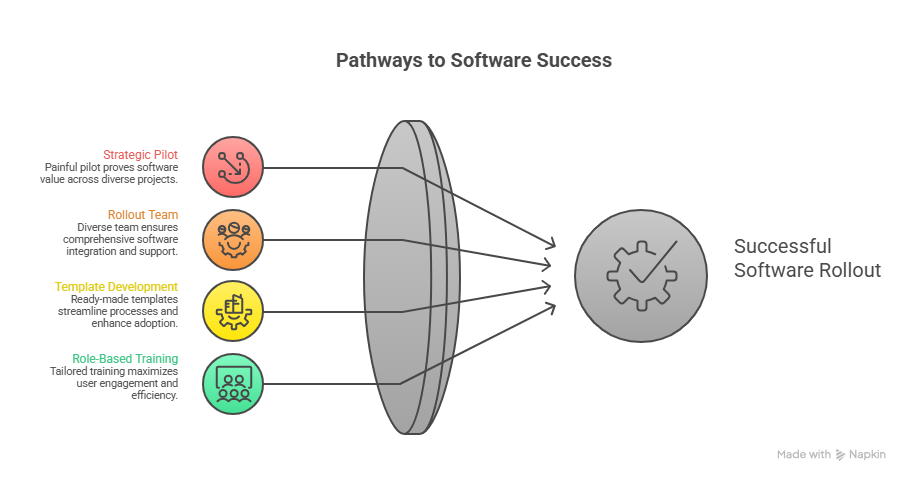
A strong rollout starts with a pilot that is painful enough to prove value. Do not pilot the tool on a tiny committee project with three tasks and no dependencies. Use one strategic initiative, one administrative process, one academic project, and one operational project. For example, pilot accreditation evidence tracking, enrollment campaign planning, a facilities improvement project, and an IT system upgrade. That mix shows whether the software can handle documentation, deadlines, approvals, dependencies, dashboards, and cross-functional communication. It also creates a better baseline for project success factors, project failure prevention, monitoring and control, and earned value thinking.
The rollout team should include academic affairs, operations, IT, finance, student services, facilities, compliance, and one respected faculty or staff champion from each major user group. IT should own security, integrations, SSO, identity, and data retention. Operations should own workflow standards. Academic leaders should shape faculty-friendly templates. Finance should validate budget fields and reporting needs. Compliance should define privacy boundaries. The PM should maintain scope, decision logs, risks, training, timeline, and adoption metrics. That structure reflects the same responsibilities described across PM leadership, stakeholder engagement, resource allocation, and project communication.
Templates should be built before institution-wide launch. Schools need ready-made workspaces for curriculum revisions, accreditation reviews, grant reporting, research milestones, campus events, facilities projects, IT implementations, policy updates, student-success initiatives, hiring searches, procurement cycles, and marketing campaigns. Each template should include owners, phases, standard tasks, review checkpoints, risks, evidence links, approval steps, and reporting fields. This prevents the classic failure where everyone receives a blank tool and invents their own process. Strong templates create faster adoption and better reporting, especially when paired with project scheduling, Gantt chart terms, schedule compression, and project closure.
Training should be role-based. Faculty do not need a three-hour lecture on every admin feature. They need to know how to update tasks, attach evidence, respond to comments, track deadlines, and see what decisions are waiting. Department chairs need workload visibility, late-task reports, and committee status. Executives need dashboards and escalation paths. Project managers need templates, dependencies, risk fields, approvals, and reporting. Students need simple boards and deadlines when the tool is used for group projects. The best adoption plan respects people’s time while still creating enough structure to end email-driven chaos. That mindset supports team building, conflict resolution, quality management, and human resource management.
5. Advanced Selection Criteria for Schools With Complex Operations
Privacy and permissions deserve executive attention. A project management tool may look harmless because it stores tasks and comments, but education work can quickly include student names, accommodation notes, disciplinary details, HR issues, donor data, research information, vendor documents, or confidential strategy. Institutions should set rules for what belongs inside the platform, what should only be linked from approved systems, and who can access each workspace. They should also review SSO, MFA, audit logs, guest controls, data retention, export permissions, and vendor security documentation. This selection discipline belongs beside risk registers, ISO standards, project governance, and contract management.
Complex schools should also test portfolio reporting. Leadership needs to know which strategic initiatives are healthy, which are slipping, which need decisions, which depend on overloaded staff, and which lack budget clarity. This matters more than colorful task boards. A platform that cannot roll up project health across academic affairs, facilities, IT, enrollment, advancement, HR, and compliance will eventually become another department-level tool. The best solutions give senior leaders reliable dashboards while still letting each department manage work in a practical way. That is the operating layer behind project portfolio management, PMO structure, project management director roles, and chief project officer roadmaps.
Integration strategy can decide success. A school already has email, calendars, LMS, SIS, HRIS, finance, file storage, forms, helpdesk, procurement, and communication tools. The PM platform should reduce tool-switching, duplicate entry, and hidden work. Microsoft-heavy institutions may benefit from Planner because it sits closer to Teams and Microsoft 365. Google-heavy environments may prefer tools with strong Google Workspace support. IT and software teams may need Jira and Confluence. Institution-wide operations may need Smartsheet, monday.com, Wrike, or Airtable. The right stack depends on existing systems, which is why buyers should approach this like software feature analysis, PM software market trends, resource allocation software, and procurement management.
The final decision should be made through proof, not preference. Score each platform on real scenarios, privacy fit, reporting depth, integration quality, template strength, user adoption, admin control, vendor support, total cost, and rollout effort. Then ask which platform will still work after the first year, when enthusiasm drops and the institution needs repeatable discipline. The winning platform should help leaders see stalled decisions, help managers control workload, help faculty avoid email archaeology, help staff stop rebuilding the same trackers, and help students experience better-run services. That is the kind of practical value APMIC emphasizes across project management career roadmaps, certification impact, future PM skills, and project success analysis.
6. FAQs About PM Software for Educational Institutions
-
Smartsheet is the best overall choice for many higher education institutions because it supports dashboards, forms, workflows, reporting, strategic planning, academic administration, and cross-department visibility. monday.com is excellent for visual administrative workflows, Microsoft Planner fits Microsoft 365 schools, Asana works well for collaborative departments, and ClickUp is strong for all-in-one task and document workflows. The best choice depends on institution size, privacy needs, integrations, reporting, and adoption culture. Buyers should evaluate tools through project governance, project scheduling, vendor management, and risk assessment.
-
Smartsheet, monday.com, Wrike, Airtable, and Microsoft Planner are strong options for multi-department universities. Smartsheet is strongest for portfolio dashboards and flexible institutional workflows. monday.com is strong for visible cross-functional work. Wrike fits marketing, communications, and approval-heavy projects. Airtable is excellent when the institution needs structured data views. Microsoft Planner works well where Microsoft 365 adoption is already deep. The decision should be based on reporting depth, permission controls, template design, and integration fit. That approach mirrors project portfolio management, PMO success, stakeholder engagement, and project reporting.
-
Trello, ClickUp, Notion, Microsoft Planner, and Asana are usually better for classroom and student projects because they are easier to learn than enterprise-heavy tools. Trello works well for visual boards, group assignments, capstones, and club projects. ClickUp offers more structure for assignments, docs, goals, and dashboards. Notion is useful for notes, knowledge bases, project pages, and student planning. Microsoft Planner fits schools already using Teams. The best classroom tool should reduce confusion, clarify ownership, and teach practical workflow habits connected to Kanban terms, Scrum basics, project initiation, and team communication.
-
Schools should define what data can be entered into the platform, who can access each workspace, how guest users are controlled, whether student-related records are allowed, how files are linked, how long data is retained, and who approves sensitive projects. IT, legal, compliance, and academic leadership should review SSO, MFA, audit logs, permission groups, vendor security documentation, and contract terms before rollout. FERPA-related considerations matter when work involves student education records, so privacy review should happen before adoption expands. This belongs beside risk registers, ISO standards, contract management, and project governance.
-
Adoption improves when the rollout solves visible pain instead of creating extra admin. Start with templates for real education work: accreditation, grants, curriculum updates, campus events, facilities projects, IT implementations, enrollment campaigns, and student-success initiatives. Train users by role, keep workflows simple, create champions, publish naming standards, define status rules, and give leadership useful dashboards. Measure adoption through active users, late tasks, approval speed, project cycle time, template usage, and stakeholder feedback. This reflects the same discipline behind change management, team building, project monitoring, and project success factors.
-
An education PM software RFP should include institution size, departments, user groups, project types, privacy requirements, integration needs, reporting goals, permission rules, guest access needs, training expectations, implementation timeline, support model, data retention requirements, pricing structure, and sample workflows. It should ask vendors to demonstrate real scenarios such as grant tracking, accreditation evidence, facilities projects, curriculum approvals, enrollment campaigns, IT rollouts, and leadership dashboards. Strong RFPs protect schools from buying software that looks good during demos and fails under institutional complexity. Build the RFP with RFP and RFQ terms, procurement management, vendor management, and project budgeting.
