
Best HR Management Tools for Project-Based Teams
Project-based teams break when people data, workload data, skills data, cost data, and delivery data live in separate places. A good HR management tool should help leaders see who is available, who is overloaded, who is underused, who needs training, and which staffing decisions will protect the project margin. The right choice depends on your team model: internal delivery team, agency, consulting firm, construction team, IT PMO, remote operation, or contractor-heavy project environment.
1. What Project-Based Teams Need From HR Software
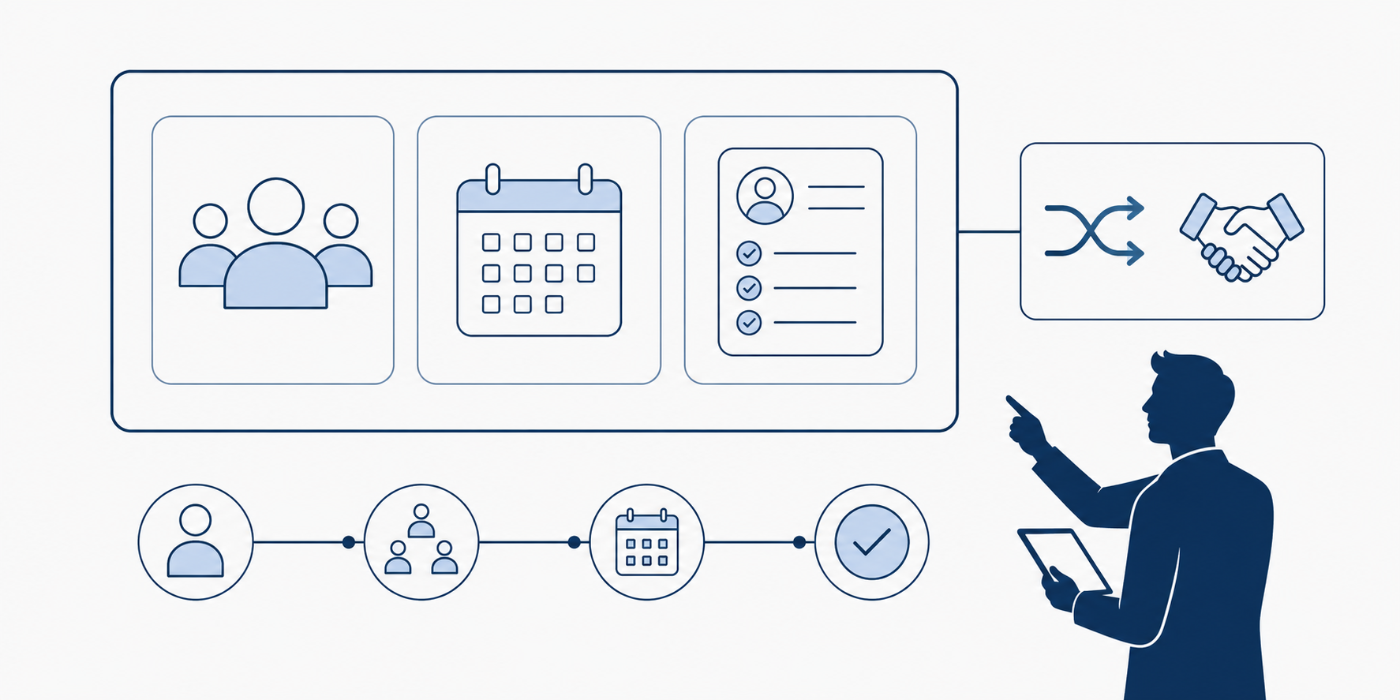
Project-based teams need HR software that supports real staffing decisions, not just clean employee records. A project manager who understands resource allocation, project scheduling, project monitoring and control, project reporting, and PM leadership communication already knows the pain: one wrong staffing assumption can damage the entire timeline.
The tool should make availability visible before work is assigned. It should show PTO, holidays, capacity, contractor status, skills, labor cost, timesheets, role coverage, and approval history in one operating rhythm. That matters because project failure root causes often hide inside small people decisions: a senior analyst gets booked across three initiatives, a contractor misses onboarding, a compliance role gets added late, or a hiring need appears after the delivery date is already at risk.
The best HR tools for project-based teams also support governance. A PMO needs traceable approvals, clean access records, role clarity, and salary or contractor cost visibility. That connects directly to project governance trends, procurement terms, contract management, stakeholder engagement, and risk registers. HR software becomes a delivery control system when it helps leaders answer one question early: can this team realistically deliver the work already promised?
2. Best HR Management Tools for Project-Based Teams
Rippling is a strong fit for project-based teams that want HR, payroll, IT, apps, devices, and workflow automation in one workforce system. That matters when a project role change should also trigger software access, payroll changes, document updates, and device permissions. Rippling says its platform can onboard hires, run payroll, manage performance, issue devices, and handle corporate cards without switching systems, which makes it useful for PMOs that hate chasing five departments for one staffing move. Pair it with strong project governance, risk mitigation, project reporting, and PMO strategy practices.
BambooHR works well for growing project teams that need clean HR records, time tracking, PTO, benefits, payroll, and employee self-service without enterprise-level heaviness. BambooHR highlights time tracking, multi-rate pay, time-off requests, benefits enrollment, and payroll in one platform, which is valuable when a team has hourly staff, part-time support, and managers approving time against changing workloads. This type of tool supports human resource management terms, team building terminology, quality management, and career growth.
Deel is best when the project workforce crosses borders, includes contractors, or depends on international hiring. Deel says it helps companies hire, pay, and manage teams in 150+ countries, which makes it especially relevant for distributed consulting, software delivery, remote PMO support, and global project operations. The pain point here is simple: a remote specialist can look affordable until taxes, local contracts, benefits, worker classification, and payment timing create delivery risk. Deel belongs in conversations about international project management, remote project management roles, global project management trends, and freelance project management.
Gusto fits small and midsize project-based businesses that need payroll, benefits, HR basics, and time tools in a simpler package. Gusto says it automatically calculates and syncs hours, PTO, and holidays with payroll, and its time tracking support includes project selection when employees clock time. That is useful for agencies, small construction teams, service firms, and startups where the founder, project manager, and operations lead may all be touching payroll. Connect it to project budgeting, cost management, project financial management, and small business project software.
Zoho People is useful for teams already using the Zoho ecosystem or needing a broad HRMS with attendance, onboarding, performance, learning, help desk, documents, engagement, and reports. Zoho describes People as a cloud HR system covering onboarding, time and attendance, performance, learning management, HR help desk, document management, engagement, and reporting. Project-based teams should consider it when they need structured HR processes but still want cost control and configurable workflows. It pairs naturally with project management software features, AI automation adoption, monitoring and control, and project execution terms.
HiBob is a strong culture, people analytics, and workflow option for fast-growing teams that want HR data to support engagement and retention. HiBob lists core HR, smart workflows, approvals, eSign, document management, time and attendance, and real-time people analytics among its capabilities. That matters in project environments where the biggest risk is quiet burnout: a star employee keeps delivering, managers keep assigning, and the system shows success until resignation exposes the real cost. HiBob connects well with team building, leadership communication, conflict resolution, and future project leadership.
Paycor and ADP Workforce Now are better fits for teams that need payroll depth, compliance support, benefits administration, and workforce management at a more established scale. Paycor highlights mobile punching, proactive alerts, geo validation, attendance management, labor cost visibility, and overtime tracking in its workforce tools. ADP Workforce Now describes a single sign-on solution for HR, payroll, time and attendance, talent, benefits, and more for U.S. and Canadian workforces. These tools fit PM-heavy employers where payroll errors, overtime rules, union or field requirements, and multi-location scheduling can damage trust quickly. They support procurement management, contract management, schedule compression, and project quality.
Workday and UKG are stronger for enterprise teams with complex workforce planning, compliance, payroll, finance, scheduling, and analytics needs. Workday positions its HCM as a flexible HR suite designed to work across HR processes, while UKG emphasizes HR, scheduling, payroll, compliance, and workforce engagement for complex service industries. These platforms make the most sense when project-based delivery is part of a larger enterprise operating model with multiple business units, locations, approval layers, and reporting audiences. They connect to project portfolio management, PPM careers, enterprise PM leadership, and chief project officer roles.
Float, Runn, Teamdeck, and Kantata deserve special attention because project-based teams often need resource management more urgently than traditional HR administration. Float focuses on resource planning, capacity, availability, time off, and profitability visibility; Runn focuses on real-time resource management, forecasting, utilization, skills, and demand; Teamdeck combines resource scheduling, time tracking, availability, leave, and custom reporting; Kantata connects scoping, resourcing, forecasting, financial management, project management, and business intelligence for professional services. These tools belong beside resource allocation, project scheduling, EVM, PM software tools, and project portfolio management.
3. How to Match the Tool to Your Project Team Model
A small agency should usually prioritize time tracking, project profitability, PTO visibility, contractor onboarding, and simple payroll. A tool stack like Gusto plus Float, BambooHR plus Teamdeck, or Zoho People plus a project planning tool can work well because the team needs speed more than enterprise complexity. The key is to connect people data to project budget terms, issue tracking software, stakeholder communication, and project closure from day one.
A consulting firm, software services company, or professional services organization needs capacity forecasting, utilization reporting, project margin visibility, billable/non-billable separation, and skills-based staffing. Runn, Float, Teamdeck, and Kantata become serious contenders here because delivery leaders must compare future demand against real available people. The tool should answer whether the firm can accept new work without creating burnout, margin loss, or quality risk. That decision connects directly to project success factors, project failure rates, agile project failure prevention, and PPM trends.
A construction, healthcare, field services, or government-adjacent project team should prioritize mobile time, geofencing where appropriate, compliance documents, certifications, pay rules, leave visibility, vendor management, and approval trails. Paycor, ADP, UKG, and similar workforce systems become stronger here because field labor and regulated work create less tolerance for messy HR operations. That choice should align with construction project management, healthcare project management, government PM careers, and procurement terminology.
A remote-first or global team needs country-specific hiring, contractor classification, payroll compliance, digital onboarding, access control, and remote-friendly reporting. Deel and Rippling often enter the shortlist because remote teams need fast onboarding and clean operational control across locations. The painful failure pattern is easy to recognize: a project wins a client, hires globally, starts delivery fast, and then discovers the workforce setup cannot support payments, contracts, local rules, or offboarding cleanly. That risk belongs inside remote PM career planning, international PM, global PM market trends, and future freelance PM trends.
The strongest HR tool decision starts with the one workflow that currently creates the most project risk.
4. Implementation Checklist: What to Configure Before You Roll It Out
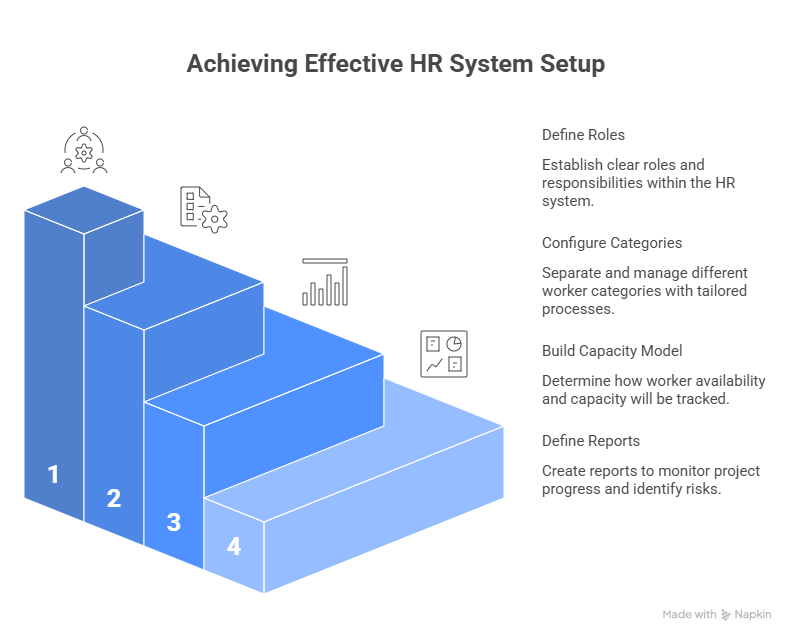
Start with roles, not software settings. Define project manager, resource manager, HR admin, finance approver, payroll owner, department head, contractor owner, and executive sponsor. The system should reflect the way work actually gets approved, staffed, paid, and reported. This aligns HR rollout with stakeholder engagement, project initiation terms, governance cadence, and project reporting best practices.
Then configure people categories. Separate employees, contractors, freelancers, interns, vendors, part-time staff, temporary staff, and external consultants. Assign each category its own onboarding checklist, document requirements, approval path, payment process, access rules, and offboarding trigger. This is where many teams lose control: they treat every worker the same inside the tool, then discover that contractors, remote hires, and field staff each carry different risk. Strong setup links to vendor management, contract management terminology, procurement terms, and risk registers.
Next, build the capacity model. Decide whether availability is tracked by hours per week, percentage allocation, billable capacity, sprint capacity, shift capacity, or milestone-based demand. A consulting team may need billable utilization. A software team may need sprint capacity. A construction team may need shift, location, trade, and certification visibility. A government project may need compliance-ready approval records. Capacity design should connect with agile estimation, sprint planning terms, critical path terms, and schedule compression.
Finally, define reports before launch. The dashboard should show open roles, project assignments, utilization, overtime, PTO conflicts, timesheet exceptions, contractor end dates, certification gaps, upcoming onboarding, and staffing risks. Reports should help leaders act before the issue becomes expensive. This is where HR software starts supporting project monitoring and control, earned value management, project failure prevention, and project success rates.
5. Mistakes That Make HR Tools Fail in Project-Based Environments
The first mistake is buying a general HR tool and expecting it to solve resource planning without configuration. A beautiful employee directory does very little for a project manager who needs to know whether three designers, two analysts, and one compliance reviewer are available next month. Project teams need staffing intelligence, not employee storage. That is why HR selection should be tied to resource allocation, project scheduling, resource allocation software, and project portfolio management.
The second mistake is ignoring payroll and project cost alignment. If timesheets live in one system, payroll in another, and project budgets in a spreadsheet, leaders will spend every month reconciling numbers instead of managing delivery. This destroys trust because finance sees one version of labor cost, project managers see another, and employees see a third on their paycheck. A serious setup should support project financial management, budgeting terms, cost management terms, and EVM basics.
The third mistake is treating implementation as an HR-only project. Project managers, department leads, finance, IT, legal, procurement, and executives all need a say because the tool will affect hiring approvals, access, reporting, forecasting, compliance, and delivery governance. When HR owns everything alone, the system often becomes clean administratively and weak operationally. A better rollout reflects stakeholder terms, communication terms, procurement management, and PMO evolution.
The fourth mistake is skipping adoption design. Employees will avoid a system that makes time entry painful, managers will delay approvals if the workflow feels buried, and executives will ignore dashboards that answer yesterday’s questions. The rollout needs short training, role-based guides, clean naming conventions, weekly exception reviews, and clear rules for when data must be updated. This matters as much as the tool itself because digital transformation, AI adoption, automation trends, and future software integration only create value when users trust the workflow.
6. FAQs About HR Management Tools for Project-Based Teams
-
The best tool depends on the team’s staffing model. Rippling is strong for workflow automation and workforce operations. BambooHR is strong for growing teams that need clean HR, time, PTO, and payroll basics. Deel is strong for global hiring and contractors. Gusto is strong for smaller businesses that need payroll simplicity. Float, Runn, Teamdeck, and Kantata are strong when resource planning and capacity visibility matter more than traditional HR administration. The best choice should match your project management career model, resource planning needs, project software stack, and budget control process.
-
Choose HR software first when payroll, onboarding, compliance, employee records, benefits, and leave administration are the biggest pain points. Choose resource management software first when overbooking, utilization, skills gaps, project staffing, and capacity forecasting are causing delivery damage. Many mature teams need both. The practical move is to map the biggest current failure: payroll errors point toward HRIS/HCM, while missed deadlines from staffing confusion point toward resource management. This decision should be guided by project failure root causes, project monitoring, risk mitigation, and project reporting.
-
Contractor-heavy teams need contract records, start and end dates, payment workflows, tax or classification support, approval history, access control, document storage, onboarding checklists, and offboarding automation. They also need visibility into which contractors are assigned to which projects, who owns the relationship, and whether extensions are approved before the contract expires. That connects directly to vendor management, contract management, procurement terms, and international PM work.
-
HR tools reduce delays by showing capacity, PTO, skills, hiring gaps, onboarding status, overtime risk, and contractor availability before the project plan becomes unrealistic. The biggest value is early warning. A dashboard that shows a missing role three weeks before kickoff is far more useful than a status meeting that discovers the same gap after work starts. Strong HR visibility supports critical path planning, schedule compression, agile estimation, and project success factors.
-
Project managers should ask vendors to demonstrate real workflows: assign a person to a project, approve time, show PTO conflict, update a role, onboard a contractor, remove access, report utilization, and forecast staffing demand for next month. A demo filled with polished dashboards can hide weak workflows. The team should test the exact pain points they face every week. This evaluation should connect to project software features, project issue tracking, project reporting terms, and PM leadership communication.
-
The clearest sign is decision delay. If managers need multiple files to answer who is available, who is overallocated, which contractor is ending, which role is unfilled, which PTO affects delivery, and which labor cost changed, the team has outgrown spreadsheets. Spreadsheets can track data, but they struggle to enforce approvals, prevent version conflict, automate reminders, and create reliable audit trails. That is the moment to explore resource allocation tools, project portfolio management, monitoring and control, and digital PMO transformation.
