
Best Scrum Project Management Tools & Platforms (2026-2027 Edition)
Scrum tools can either protect the sprint or quietly corrupt it. The wrong platform turns the backlog into a dumping ground, hides blockers until review day, and makes velocity look cleaner than reality. The right tool gives Scrum Masters, Product Owners, developers, stakeholders, and leadership one shared operating system for sprint goals, backlog refinement, delivery evidence, and inspection. This 2026-2027 guide helps PMs compare tools by actual Scrum control, not shiny dashboards.
1. What Makes a Scrum Project Management Tool Worth Choosing in 2026-2027
A strong Scrum tool should support the real mechanics of Scrum: product backlog, sprint backlog, sprint goal, daily inspection, increment visibility, review readiness, and retrospective learning. The Scrum Guide defines the Sprint Backlog as the Sprint Goal, selected Product Backlog items, and the plan for delivering them, so your tool should make that connection visible instead of scattering work across disconnected boards, chats, and spreadsheets.
For PMs, the tool also needs to connect Scrum execution with broader project management terms, project initiation language, project scheduling terms, and project risk management. A sprint board without risk visibility may look organized while the project drifts toward missed commitments.
The biggest buying mistake is choosing a tool because it looks simple in a demo. Scrum simplicity should live in the workflow, not in missing controls. Your platform should help teams refine backlog items, estimate effort, track blockers, manage capacity, review sprint health, handle spillover honestly, and document decisions. That matters for project reporting software, dashboard tools, resource allocation software, and issue tracking platforms.
| Capability | What “Good” Looks Like | Why It Matters | Best-Fit Tool Types | Warning Sign |
|---|---|---|---|---|
| Product backlog | Ordered, searchable, refined, tagged, estimated, and tied to product goals. | Stops the backlog from becoming a random request pile. | Jira, Azure Boards, Zoho Sprints, Scrumwise. | Backlog items have no value, owner, or acceptance criteria. |
| Sprint planning | Teams can select work, set goals, check capacity, and confirm commitment. | Protects the sprint from overloading and false confidence. | Jira, Azure Boards, ClickUp, Asana. | Sprint scope is chosen by wishful thinking. |
| Sprint goal tracking | The sprint goal stays visible beside work items and progress signals. | Prevents teams from completing tasks while missing the actual outcome. | Jira, Linear, Shortcut, monday dev. | People track tickets but cannot explain the sprint objective. |
| Story estimation | Story points, estimates, or sizing fields are easy to apply and review. | Improves planning, forecasting, and team capacity conversations. | Jira, ClickUp, Zoho Sprints, Scrumwise. | Every story looks equal until delivery starts. |
| Velocity visibility | Velocity can be reviewed without turning it into a weapon against the team. | Supports planning maturity and realistic forecasting. | Jira, Azure Boards, Zoho Sprints, Scrumwise. | Managers treat velocity as individual productivity scoring. |
| Burndown chart | Burndown reflects remaining work clearly during the sprint. | Exposes mid-sprint risk before review day embarrassment. | Jira, Azure Boards, Zoho Sprints, Scrumwise. | The chart looks good because work was split or closed artificially. |
| Blocked work flags | Blocked items are visible, owned, dated, and connected to resolution actions. | Keeps impediments from hiding inside comments. | Jira, ClickUp, Linear, Shortcut. | Blockers are discussed in standup but never logged. |
| Dependency mapping | Teams can see linked work, predecessor tasks, and cross-team impacts. | Protects sprint commitments from invisible external dependencies. | Azure Boards, Jira, Wrike, Asana. | Dependencies are remembered by one senior person only. |
| Release planning | Sprints connect to versions, releases, milestones, or product launches. | Links sprint delivery with roadmap accountability. | Jira, Azure Boards, Linear, Scrumwise. | Teams finish sprint work without clear release readiness. |
| Retrospective evidence | Sprint data, blockers, cycle issues, and spillover are easy to review. | Makes retrospectives specific instead of emotional or vague. | Jira, ClickUp, Azure Boards, Zoho Sprints. | The retro depends on memory and complaints. |
| Definition of Done | DoD can be reflected through checklists, workflow states, reviews, or required fields. | Stops premature “done” claims from damaging quality. | Jira, ClickUp, Asana, Wrike. | Done means different things to QA, product, and engineering. |
| Acceptance criteria | Criteria are attached to stories before sprint commitment. | Reduces rework, dispute, and late-stage rejection. | Jira, Azure Boards, Asana, Shortcut. | Work enters the sprint with vague success language. |
| Workflow customization | Teams can model real work states without creating administrative clutter. | Supports accurate visibility across different delivery environments. | Jira, monday dev, ClickUp, Wrike. | The workflow has twelve statuses nobody uses correctly. |
| Git integration | Development work connects to commits, pull requests, and release activity. | Improves traceability for software teams. | Jira, Azure Boards, Linear, Shortcut. | Engineering evidence lives outside the project system. |
| Cross-functional visibility | Non-technical stakeholders can understand sprint status without decoding engineering jargon. | Improves sponsor trust and reduces status friction. | monday dev, Asana, Wrike, ClickUp. | Executives need a separate deck to understand every sprint. |
| Capacity planning | Workload, availability, and sprint load are visible before commitment. | Prevents burnout disguised as ambition. | ClickUp, Wrike, Asana, Azure Boards. | The sprint is full before PTO, defects, and support work are considered. |
| Portfolio alignment | Sprint work connects to epics, initiatives, goals, or strategic themes. | Helps leadership see why sprint work matters. | Jira, Azure Boards, Shortcut, Linear. | Teams ship outputs with unclear strategic value. |
| Automation | Repeatable transitions, reminders, assignments, and rollover rules reduce manual admin. | Lets Scrum Masters spend less time chasing updates. | ClickUp, monday dev, Jira, Asana. | Automation hides problems instead of surfacing them. |
| Reporting | Reports show sprint health, backlog aging, blockers, throughput, and delivery trends. | Turns Scrum from ceremony into inspectable delivery control. | Jira, Azure Boards, Zoho Sprints, Wrike. | Reports only show completed tasks. |
| Roadmap view | Teams can connect sprint work to product direction and future releases. | Prevents sprint-by-sprint tunnel vision. | Linear, Jira, Shortcut, monday dev. | The roadmap is stored in slides while delivery lives elsewhere. |
| Stakeholder access | Stakeholders can view relevant progress without disrupting team workflow. | Reduces update meetings and status confusion. | monday dev, Asana, Wrike, Trello. | Stakeholders ask for screenshots because they distrust the system. |
| Mobile access | Approvals, comments, blockers, and status checks work on mobile. | Supports distributed and fast-moving teams. | ClickUp, Asana, Trello, monday dev. | Critical updates wait until someone returns to a laptop. |
| Documentation link | Stories connect to specs, decisions, product notes, and meeting outputs. | Reduces knowledge loss and repeated clarification. | Confluence with Jira, ClickUp Docs, Asana, Notion-linked workflows. | Acceptance logic lives in scattered chat threads. |
| Scaling support | Multiple teams can coordinate epics, releases, dependencies, and reporting. | Protects larger programs from Scrum chaos at scale. | Jira, Azure Boards, Wrike, Shortcut. | Each team uses a different definition of progress. |
| Ease of adoption | The team can start quickly without losing core Scrum discipline. | Reduces tool resistance and shadow systems. | Trello, Asana, Zoho Sprints, Scrumwise. | People return to spreadsheets after the first sprint. |
| Governance control | Permissions, audit trails, approvals, and access rules match organizational risk. | Important for regulated, enterprise, and government environments. | Jira, Azure Boards, Wrike, monday dev. | Anyone can change sprint structure without accountability. |
| Cost fit | The pricing model matches team size, reporting needs, integrations, and admin load. | Prevents paying enterprise prices for a lightweight team need. | Zoho Sprints, Trello, Taiga, Asana. | The cheapest tool creates expensive delivery blind spots. |
| Process fit | The tool supports the team’s real Scrum maturity instead of forcing fake maturity. | Improves adoption, data quality, and sprint reliability. | All tools, depending on team context. | The tool looks mature while the team’s behavior stays chaotic. |
2. Best Scrum Tools for Software, Product, and Engineering Teams
Jira Software remains one of the strongest choices for technical Scrum teams that need backlog control, sprint boards, agile reporting, epics, versions, and deep workflow customization. Atlassian’s Jira Scrum backlog supports creating and updating work items, ranking them, assigning them to sprints, epics, or versions, and planning sprints from the backlog; Jira reporting also supports sprint insight and progress tracking.
Jira is especially useful when your organization already has mature Scrum roles, disciplined project issue tracking, structured software project management, and a real need for project reporting analytics. Its danger is over-customization: weak teams can build complex workflows that look impressive while slowing delivery.
Azure Boards is a strong fit for teams living inside Microsoft and Azure DevOps. Microsoft describes Azure Boards as supporting Kanban boards, backlogs, team dashboards, custom reporting, drag-and-drop sprint planning, work-item tracking, traceability, and Scrum boards. Microsoft’s Scrum tool guidance also describes the Taskboard as an interactive view for work required to complete the sprint backlog.
Azure Boards makes sense when development, testing, deployment, and governance are already connected to Microsoft ecosystems. It works well for teams that care about scheduling discipline, critical path visibility, project dashboard reporting, and enterprise project management software. The main pain point is adoption: non-technical stakeholders may need cleaner views than engineering teams use every day.
Linear is best for modern product-engineering teams that want speed, clean issue tracking, cycle planning, roadmap visibility, and less administrative friction. Linear positions itself as a product development system for planning and building products, with features spanning roadmap-to-release work and cycle planning.
Linear fits teams that already understand Agile delivery and want a focused tool instead of a heavy PM environment. It pairs naturally with Agile certification paths, Scrum Master career planning, software industry PM tools, and future project manager skills. It is strongest when product and engineering share disciplined habits.
Shortcut is a focused choice for software teams that want stories, iterations, projects, goals, and development workflow visibility without turning every sprint into an admin exercise. Shortcut describes itself as a place where software teams plan and build products, create and track development work, view progress, map projects, and connect work to goals.
Shortcut is useful when a PM needs stronger product-to-delivery alignment than a lightweight board can provide. It supports teams working through Agile project management, hybrid delivery models, project success factors, and delivery management career growth.
3. Best Scrum Platforms for Cross-Functional, Business, and Hybrid Teams
ClickUp is a strong all-in-one Scrum option for teams that want sprint planning, tasks, docs, dashboards, goals, automations, and cross-functional collaboration in one workspace. ClickUp’s sprint features include sprint dates, points, priorities, unfinished-work automation into the next sprint, and syncing with GitHub, GitLab, or Bitbucket.
ClickUp suits teams that need Scrum controls but also handle marketing tasks, operations work, documentation, approvals, and stakeholder communication. It pairs well with project communication techniques, document management software, automation tools, and productivity software for PMs. The risk is configuration sprawl: teams should create a standard sprint template before every department invents its own version.
monday dev / monday.com is useful for cross-functional Scrum teams that need visual planning, stakeholder-friendly boards, automations, templates, and flexible views. monday.com’s Scrum planning template describes support for sprint reviews, user stories, sprint retrospectives, and sprint management activities.
monday dev is especially valuable when business users, product teams, executives, and delivery teams need shared visibility without forcing everyone into engineering-style issue language. It connects well with stakeholder management terms, project communication terms, project dashboard tools, and CRM tools for PMs.
Asana works well for business, product, marketing, and operations teams adopting Scrum-style sprint planning without needing a developer-heavy issue tracker. Asana’s Agile and Scrum guidance covers planning sprints, tracking backlogs, running daily standups, using Kanban boards, and custom fields; its sprint planning template supports sprint goals, backlog prioritization, owners, dependencies, and deadlines.
Asana is a strong choice when teams need clarity, ownership, dependencies, workload visibility, and stakeholder communication. It pairs naturally with team building terminology, human resource management terms, calendar and scheduling tools, and remote project management roles.
Wrike is best for hybrid teams that need Scrum-style execution with workload management, approvals, dashboards, proofing, and structured cross-functional operations. Wrike describes Scrum support around backlogs, team performance dashboards, timelines, dependencies, user stories, tasks, priorities, deadlines, customizable workflows, and proofing tools.
Wrike is practical when Scrum work overlaps with client delivery, creative review, operations, shared resources, and formal reporting. It connects well with resource allocation tools, project quality terms, project reporting software, and remote collaboration apps.
4. Best Lightweight, Budget-Friendly, and Dedicated Scrum Tools
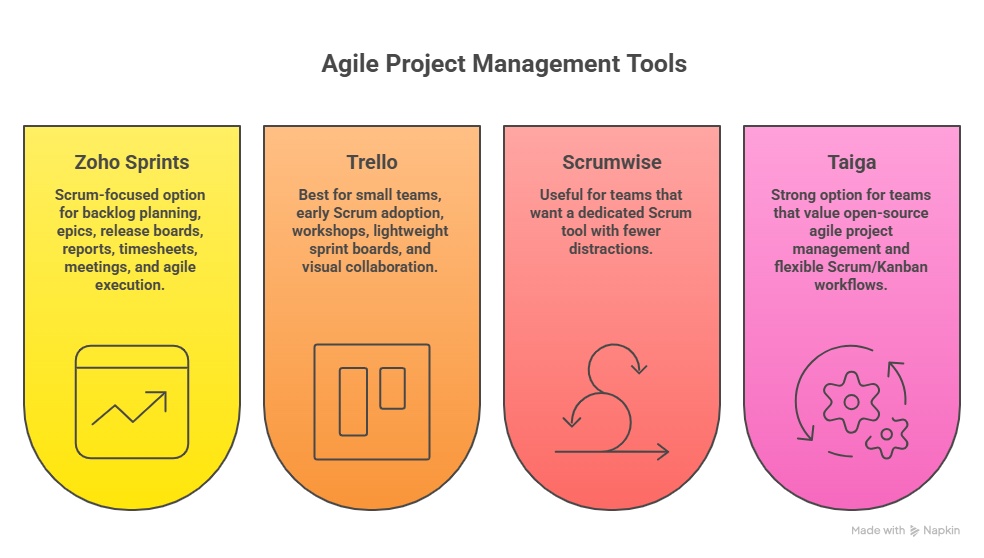
Zoho Sprints is a strong Scrum-focused option for teams that want backlog planning, epics, release boards, reports, timesheets, meetings, and agile execution without buying a heavyweight enterprise system. Zoho describes Sprints as agile project management software for planning, tracking, iterating, and delivering fast-paced projects, with backlog and epics features for planning and organizing work.
Zoho Sprints fits growing teams that need structure before they need enterprise complexity. It supports PMs working through budgeting terms, cost management terms, Agile career growth, and PM software training. It is especially attractive when the team wants native Scrum language without building every field from scratch.
Trello is best for small teams, early Scrum adoption, workshops, lightweight sprint boards, and visual collaboration. Trello’s Scrum board templates are designed to help teams start a Scrum board and customize it as the process evolves.
Trello works when the team values simplicity over deep reporting. It can support basic sprint flow, backlog columns, review columns, and stakeholder visibility, especially when paired with appropriate power-ups. It connects well with mobile PM apps, collaboration apps, team-building terms, and project productivity tools.
Scrumwise is useful for teams that want a dedicated Scrum tool with fewer distractions. Scrumwise describes support for backlogs, releases, sprints, Kanban boards, delivery prediction, team coordination, backlog organization with lists, tags, filters, epics, subtasks, checklists, release planning, expected velocities, and burnup.
Scrumwise fits Scrum Masters who want clean Scrum mechanics without a sprawling work management suite. It is useful for teams studying Scrum roles and responsibilities, Scrum certification paths, Scrum versus Agile certification, and Agile coach career growth.
Taiga is a strong option for teams that value open-source agile project management and flexible Scrum/Kanban workflows. Taiga’s official site highlights Kanban customization, epics, subtasks, workflows, swimlanes, filters, WIP limits, and switching between Scrum and Kanban.
Taiga is useful for teams that want transparency, flexibility, and control over their agile environment. It works well for technical groups, lean teams, and organizations that care about adaptable tooling. It pairs naturally with Scrumban concepts, software development PM, future PM software trends, and AI automation in project management.
5. How to Choose the Right Scrum Platform Without Buying the Wrong Complexity
Start with the team’s pain, then choose the platform. If the pain is backlog disorder, prioritize backlog ranking, refinement fields, epics, acceptance criteria, and aging reports. If the pain is missed sprint commitments, prioritize capacity planning, burndown, blocker flags, sprint goal visibility, and spillover tracking. This decision logic connects directly to risk identification terms, issue tracking tools, project reporting analytics, and project success factors.
For engineering-heavy Scrum, compare Jira, Azure Boards, Linear, and Shortcut first. For mixed business and product teams, compare ClickUp, monday dev, Asana, and Wrike. For lightweight or budget-conscious teams, compare Zoho Sprints, Trello, Scrumwise, and Taiga. This gives PMs a practical shortlist that supports project management software selection, resource allocation software, Gantt chart planning, and project scheduling tools.
Your demo script should test real sprint scenarios. Ask vendors to show backlog refinement, sprint planning, mid-sprint blocker escalation, incomplete work rollover, stakeholder reporting, retrospective evidence, dependency visibility, and release linkage. A tool that looks beautiful with sample data can collapse under messy real work. PMs should evaluate it against quality management terms, communication techniques, stakeholder terminology, and project governance trends.
Watch for five red flags. First, the tool cannot show sprint goal progress clearly. Second, the backlog has no meaningful refinement workflow. Third, reports show activity but hide risk. Fourth, stakeholders need a separate manual report every week. Fifth, the team needs three extra tools to explain what the Scrum tool should already show. These red flags often connect to project failure root causes, top PM challenges, workforce trends, and future remote PM work.
Finally, choose for adoption quality, not feature count. A smaller tool used honestly beats a massive platform filled with stale fields, fake estimates, and ignored dashboards. Scrum rewards transparency, inspection, and adaptation. The tool should make those behaviors easier. That mindset strengthens CAPM preparation, PMP exam readiness, PRINCE2 comparison thinking, and project manager career growth.
6. FAQs About Scrum Project Management Tools and Platforms
-
The best Scrum tool depends on team type, maturity, workflow complexity, and reporting needs. Jira is usually strongest for technical Scrum teams, Azure Boards is strong for Microsoft-based engineering environments, ClickUp is useful for all-in-one sprint collaboration, monday dev works well for visual cross-functional planning, Asana fits business teams adopting Scrum, and Zoho Sprints is strong for focused agile teams. Your choice should support Scrum roles, project scheduling, risk management, and project reporting.
-
Jira, Azure Boards, Linear, and Shortcut are the strongest shortlist for software development teams. Jira gives deep Scrum reporting and backlog control, Azure Boards connects naturally with Azure DevOps, Linear supports fast product-engineering workflows, and Shortcut connects development work to goals and product planning. Software PMs should compare these against software development PM tools, issue tracking software, Agile project management trends, and AI automation trends.
-
Trello, Asana, Zoho Sprints, and Scrumwise are usually easier for beginners because they reduce setup friction and make basic sprint flow easier to understand. Trello is highly visual, Asana is friendly for business teams, Zoho Sprints uses agile language directly, and Scrumwise keeps the interface centered on Scrum mechanics. Beginners should also study top PM terms, project initiation terms, Scrum roles, and team-building terminology.
-
Every Scrum tool should support product backlog management, sprint planning, sprint goal visibility, story ownership, estimates, acceptance criteria, blocker tracking, burndown or progress reporting, retrospective evidence, and stakeholder visibility. Stronger tools also support dependency mapping, release planning, workload views, automations, integrations, and portfolio alignment. These features connect with requirements management, quality management terms, dashboard tools, and knowledge management software.
-
Choose Jira when the team needs deep technical Scrum workflows, agile reporting, issue tracking, versions, development integrations, and enterprise customization. Choose ClickUp when the team needs Scrum plus docs, dashboards, goals, automations, task management, and cross-functional collaboration in one workspace. The decision should reflect delivery environment, team maturity, admin capacity, and reporting needs. PMs should compare both against project management software options, automation tools, reporting platforms, and software PM tools.
-
Scrum tools help stakeholders when they translate sprint work into visible goals, progress, risks, blockers, release dates, and decisions. Stakeholders rarely need every ticket detail; they need trust that the team is moving toward a valuable increment and that risks are visible early. Strong stakeholder views support stakeholder management terms, communication techniques, project reporting software, and dashboard visualization tools.
-
Evaluate ROI by measuring planning time saved, fewer missed commitments, faster blocker resolution, cleaner stakeholder reporting, reduced rework, better backlog health, improved sprint predictability, and fewer status meetings. Tool ROI should show up as delivery control, not just prettier dashboards. PMs should connect ROI to cost management terms, budgeting terminology, project success factors, and project failure analysis.
