
A project can have a detailed schedule, assigned resources, and an approved budget while still missing critical deliverables. A work breakdown structure (WBS) prevents these gaps by dividing the complete project scope into manageable, verifiable work packages. This guide provides a free WBS template, a 35-work-package example, practical decomposition rules, and a completed WBS dictionary entry. You'll learn how to establish scope boundaries, assign accountability, estimate costs, and control changes using proven project management templates, RACI responsibility mapping, and project governance practices.
1. What Is a Work Breakdown Structure, and How Does the 100% Rule Prevent Scope Gaps?
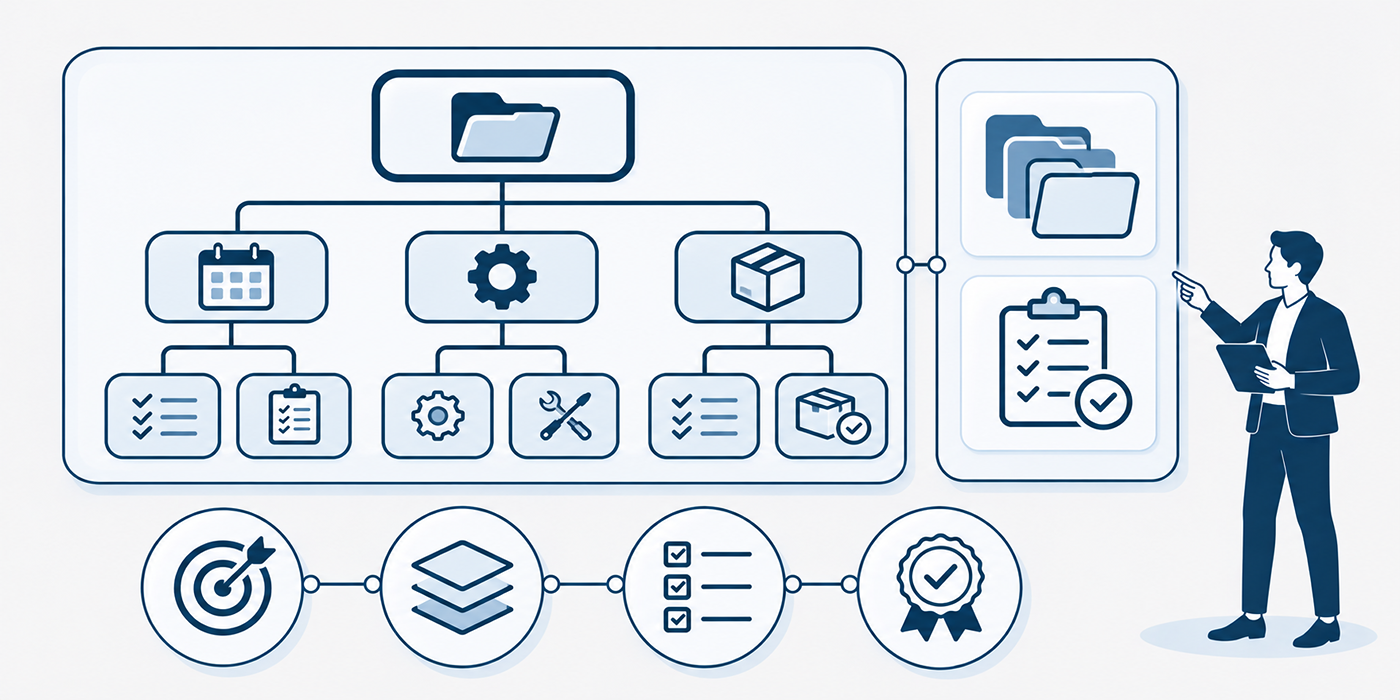
A work breakdown structure (WBS) is a hierarchical decomposition of the total work required to deliver a project's approved scope. It organizes work around deliverables and progressively breaks larger outcomes into smaller components that can be estimated, assigned, and verified.
According to PMI's work breakdown structure guidance, a WBS provides a foundation for managing scope, planning project activities, and organizing project work. It also supports more accurate project cost forecasting, governance reporting, and resource accountability.
Understand the Three Levels of a Practical WBS
Consider a company launching a customer self-service portal.
The hierarchy begins with the complete project, then separates the major deliverable groups, and finally identifies individual work packages.
Level 1: Complete project
1.0 Customer Self-Service Portal Launch
This represents all work necessary to deliver the approved portal initiative, including management, implementation, testing, deployment, and transition.
Level 2: Major deliverable groups
Examples include project control deliverables, requirements, solution design, platform implementation, quality assurance, launch readiness, and operational transition.
Level 3: Individual work packages
Within platform implementation, 1.4.3 Service Request Workflow identifies a specific deliverable that can be defined, estimated, assigned, and accepted.
These hierarchical identifiers create traceability between scope, budgets, ownership, and progress. The structure supports business analysis requirements, technology project delivery, and program-level reporting.
Apply the 100% Rule Without Double-Counting Work
The 100% rule requires each parent WBS element to include all work represented by its child elements. Collectively, the WBS must cover the entire approved project scope, including necessary internal and project management deliverables.
For example, if the parent deliverable is Production-Ready Portal, its decomposition must account for the required application components, integrations, configuration, testing, and release acceptance.
Missing security validation creates a scope gap. Placing the same integration work under two separately budgeted packages creates an overlap.
Both situations undermine cost estimates, resource planning, and performance reporting.
A practical completeness test asks whether every contractual commitment, acceptance criterion, compliance obligation, and required project management deliverable has an identified place in the hierarchy.
Distinguish Work Packages From Schedule Activities
A WBS defines the deliverables and associated work within the scope. A schedule defines the activities, sequence, duration, and timing required to produce those deliverables.
For example:
WBS work package: 1.4.3 Service Request Workflow
Schedule activities: Design approval states, configure workflow rules, connect notification services, test exception handling, and obtain acceptance.
This distinction matters when establishing the critical path, tracking earned value performance, and coordinating Agile or hybrid delivery.
The following completed WBS example provides 35 work packages across seven major deliverable groups. It can be adapted to an IT implementation, enterprise transformation, or customer-facing digital project.
| WBS ID | Deliverable / Work Package | Included Scope | Acceptance Evidence | Primary Accountability |
|---|---|---|---|---|
| 1.1 Project Control Deliverables | ||||
| 1.1.1 | Approved Project Charter | Business objectives, scope boundaries, initial authority and success criteria | Signed charter with named sponsor | Project Sponsor |
| 1.1.2 | Stakeholder Engagement Baseline | Register, influence analysis, engagement requirements and ownership | Reviewed stakeholder register and engagement plan | Project Manager |
| 1.1.3 | Integrated Planning Baseline | Approved scope, WBS dictionary, cost and schedule baselines | Baselines approved by authorized governance | Project Manager |
| 1.1.4 | Risk, Assumption and Decision Records | Risk register, dependencies, issues, assumptions and decision history | Active records with owners and response plans | Project Manager |
| 1.1.5 | Change Control Records | Change requests, impact assessments and formal decisions | Version-controlled decisions and approved updates | Change Authority |
| 1.2 Requirements and Compliance Deliverables | ||||
| 1.2.1 | Customer Journey Catalogue | Current and future journeys for service request submission and tracking | Journey scenarios reviewed with representatives | Business Analyst |
| 1.2.2 | Functional Requirements Specification | User actions, workflow rules, notifications and exception scenarios | Requirements approved by product owner | Product Owner |
| 1.2.3 | Nonfunctional Requirements Baseline | Performance, availability, accessibility and supportability targets | Measurable targets approved by technical and business owners | Solution Architect |
| 1.2.4 | Privacy and Data Requirements | Data inventory, retention needs, lawful processing and access restrictions | Privacy assessment and control requirements reviewed | Privacy Lead |
| 1.2.5 | Requirements Traceability Baseline | Linkage from requirements to work packages and acceptance tests | All in-scope requirements assigned verification methods | Business Analyst |
| 1.3 Experience and Solution Design Deliverables | ||||
| 1.3.1 | Approved Information Architecture | Portal navigation, page hierarchy and service categories | Navigation design approved | UX Lead |
| 1.3.2 | Accessible Interaction Prototype | Responsive screens, form states and accessibility patterns | Prototype review and accessibility findings resolved | UX Lead |
| 1.3.3 | Content and Migration Specification | Content ownership, required migration fields and exclusions | Content inventory and migration boundaries approved | Content Lead |
| 1.3.4 | Solution Architecture Package | System components, integration interfaces and deployment architecture | Architecture decision record approved | Solution Architect |
| 1.3.5 | Design Approval Package | Consolidated business, UX, technical and compliance approvals | Signed design-gate record | Design Authority |
| 1.4 Platform and Integration Deliverables | ||||
| 1.4.1 | Configured Application Environments | Development, test, staging and production configurations | Environment readiness checklist passed | Platform Lead |
| 1.4.2 | Identity and Authentication Module | Login, role access and session controls | Identity integration acceptance tests passed | Engineering Lead |
| 1.4.3 | Service Request Workflow | Request creation, validation, routing, status and notification logic | Approved workflow scenarios pass acceptance | Product Owner |
| 1.4.4 | CRM Integration Package | API contracts, data mapping, retries and integration error handling | End-to-end data reconciliation approved | Integration Lead |
| 1.4.5 | Analytics Event Implementation | Tracking events, consent handling and event definitions | Validated event payloads and tracking coverage | Analytics Lead |
| 1.5 Quality and Security Deliverables | ||||
| 1.5.1 | Test Strategy and Coverage Baseline | Test cases, entry/exit criteria and defect severity definitions | Approved test coverage mapped to requirements | QA Lead |
| 1.5.2 | Integration Test Evidence | Interface validation, errors, retries and data reconciliation | Required integration tests passed | QA Lead |
| 1.5.3 | Accessibility Conformance Evidence | Keyboard, assistive technology and accessibility checks | Agreed accessibility criteria verified | Accessibility Lead |
| 1.5.4 | Security Assurance Package | Vulnerability testing, remediation and security exceptions | Security release approval recorded | Security Lead |
| 1.5.5 | User Acceptance Approval | Business scenarios, critical defect resolution and acceptance decision | Product owner or authorized business sign-off | Business Owner |
| 1.6 Launch and Adoption Deliverables | ||||
| 1.6.1 | Cutover and Rollback Package | Deployment sequence, decision gates and recovery procedures | Approved release and rollback rehearsal | Release Manager |
| 1.6.2 | Operational Runbook | Monitoring, support escalation, backups and operational procedures | Runbook validated by operations | Operations Lead |
| 1.6.3 | User Training Materials | Role-based guides, support instructions and training resources | Materials reviewed by user representatives | Training Lead |
| 1.6.4 | Launch Communication Package | Customer notices, internal communications and service information | Approved messages released to target audiences | Communications Lead |
| 1.6.5 | Production Launch Validation | Smoke tests, business checks and initial service monitoring | Go-live validation record approved | Release Manager |
| 1.7 Operational Transition and Closure Deliverables | ||||
| 1.7.1 | Support Ownership Agreement | Support responsibilities, escalation contacts and service boundaries | Operations acceptance and named service owners | Service Owner |
| 1.7.2 | Hypercare Completion Record | Initial post-launch issue response and exit criteria | Outstanding defects transferred or closed under agreed thresholds | Support Lead |
| 1.7.3 | Benefits Measurement Baseline | Adoption metrics, customer outcomes and post-launch measurement ownership | Benefit measures and responsible owners approved | Business Owner |
| 1.7.4 | Contract and Supplier Handover | Licenses, warranties, supplier contacts and contractual obligations | Handover evidence accepted by operations and procurement | Procurement Lead |
| 1.7.5 | Final Closure and Lessons Learned | Scope acceptance, project records, financial closure and lessons | Authorized closure approval recorded | Project Manager |
2. How to Create a Free Work Breakdown Structure Template in Excel or Google Sheets
A useful WBS template should support hierarchical decomposition, scope control, ownership, and acceptance. Excel and Google Sheets are suitable for smaller projects because they allow filtering, version control, formulas, and straightforward collaboration.
More complex initiatives may require integration with project management APIs, enterprise delivery software, or a structured project governance system.
Step 1: Create the Template Columns
Use the following column structure:
WBS ID | Parent ID | Deliverable | Scope Description | Included Work | Exclusions | Acceptance Criteria | Accountable Owner | Dependencies | Estimated Cost | Status | Baseline Version | Change Request ID
Each field solves a specific management problem.
The WBS ID preserves hierarchical traceability. The Parent ID connects a work package to its higher-level deliverable. Inclusions and exclusions establish scope boundaries. Acceptance criteria define completion, while the accountable owner clarifies who must approve the result.
Dependencies and cost estimates support subsequent planning. Baseline and change references preserve control when scope evolves.
For resource accountability, align ownership with a RACI responsibility matrix. For financial tracking, connect estimates to earned value management calculations. For project records, use consistent management documentation templates.
Step 2: Define the Top-Level Scope Before Decomposition
Begin with the approved project objective, major requirements, contractual commitments, and explicit exclusions.
For the customer portal example, the project delivers a functioning web portal that supports authenticated customers, service request submission, status tracking, and integration with the existing CRM.
The approved scope excludes a native mobile application and replacement of the existing CRM.
These boundaries should appear in the project's scope statement and supporting project governance documentation. Validate technical assumptions through business analysis practices and IT project planning.
Step 3: Break Major Deliverables Into Work Packages
Decompose each major deliverable until the resulting components can be meaningfully estimated, monitored, and accepted.
For example, Platform and Integration Deliverables (1.4) contains five work packages covering environments, authentication, service workflows, CRM integration, and analytics tracking.
Use a consistent numbering sequence such as 1.4.1, 1.4.2, and 1.4.3.
The stopping point depends on complexity, uncertainty, and management needs. The frequently cited 8/80-hour guideline can be used as an optional heuristic, but it is not a universal PMI requirement.
A technically complex integration may warrant further decomposition, while a small marketing project deliverable may remain manageable as one package.
Step 4: Assign Acceptance Criteria Before Estimating Costs
For each work package, describe the evidence required to demonstrate completion.
For 1.4.3 Service Request Workflow, acceptance may require successful execution of every mandatory workflow scenario, correct validation messages, appropriate access restrictions, and approved handling of failed submissions.
This prevents vague completion claims and provides a foundation for project quality management, performance forecasting, and cost control.
Step 5: Review the 100% Rule and Establish a Baseline
Before approval, examine every WBS branch for missing requirements, duplicated work, unclear responsibilities, and unsupported estimates.
Confirm that the sum of the child work packages represents the full scope of each parent deliverable.
Then obtain approval from the appropriate project authority and record the baseline version.
Future changes should follow the established project governance process. Updated work packages should retain traceability to the original approval and relevant scope documentation.
3. Complete WBS Example: How to Write a Work Package Dictionary
A WBS hierarchy identifies the project's deliverables. The WBS dictionary provides the details needed to interpret those deliverables consistently.
A strong dictionary entry defines boundaries, acceptance conditions, assumptions, ownership, dependencies, and estimation requirements. PMI's work breakdown structure guidance emphasizes how these descriptions help establish the meaning of individual WBS components.
Worked Example: WBS 1.4.3 Service Request Workflow
WBS ID: 1.4.3
Parent deliverable: 1.4 Platform and Integration Deliverables
Work package: Service Request Workflow
Scope description: Deliver the approved portal functionality for customer service request creation, submission, validation, routing, status tracking, and notifications.
Included work: Request form functionality, workflow status transitions, input validation, submission confirmation, and notification logic.
Excluded work: CRM API transport implementation, identity infrastructure, and organization-wide analytics reporting, each covered by another defined package.
Dependencies: Approved functional requirements (1.2.2), solution architecture (1.3.4), identity controls (1.4.2), and CRM interface specifications associated with 1.4.4.
Accountable owner: Product Owner.
Acceptance criteria: All approved mandatory workflow scenarios pass agreed acceptance tests, permission rules operate correctly, and authorized business representatives approve the deliverable.
Completion evidence: Test results, demonstration records, defect disposition, and business acceptance.
Change-control rule: Any additional workflow capability outside the approved baseline requires an impact assessment and authorized decision.
This entry provides clearer scope control than a work package named simply "Build Portal Features."
It also helps coordinate business analysis, engineering responsibilities, and approval accountability.
How to Identify Missing or Overlapping Work
Suppose the engineering team interprets CRM error handling as part of the service workflow, while the integration team assumes it belongs exclusively to the CRM integration package.
Both teams may estimate the same work, or each may expect the other to deliver it.
The dictionary resolves this by defining interface ownership and identifying where individual responsibilities end.
For example, 1.4.3 may own the customer-facing error message, while 1.4.4 owns API retry logic and technical exception processing.
That distinction improves resource allocation, cost forecasting, and project governance oversight.
Validate the Deliverable Against the Business Objective
Technical acceptance alone may be insufficient when the project has measurable business outcomes.
For instance, the workflow may pass functional testing while introducing unnecessary steps that discourage customers from completing service requests.
The WBS should include required usability and acceptance deliverables, while benefits measurement should connect the project to business outcomes after launch.
This connection supports executive project management, program-level benefits planning, and predictive project performance analysis.
4. How to Connect Your WBS to the Project Schedule, Budget, and RACI Matrix
A completed WBS becomes more valuable when it connects directly to scheduling, financial management, and accountability.
The same WBS identifiers should appear consistently across project records so a manager can trace a cost variance or delivery problem back to the responsible work package.
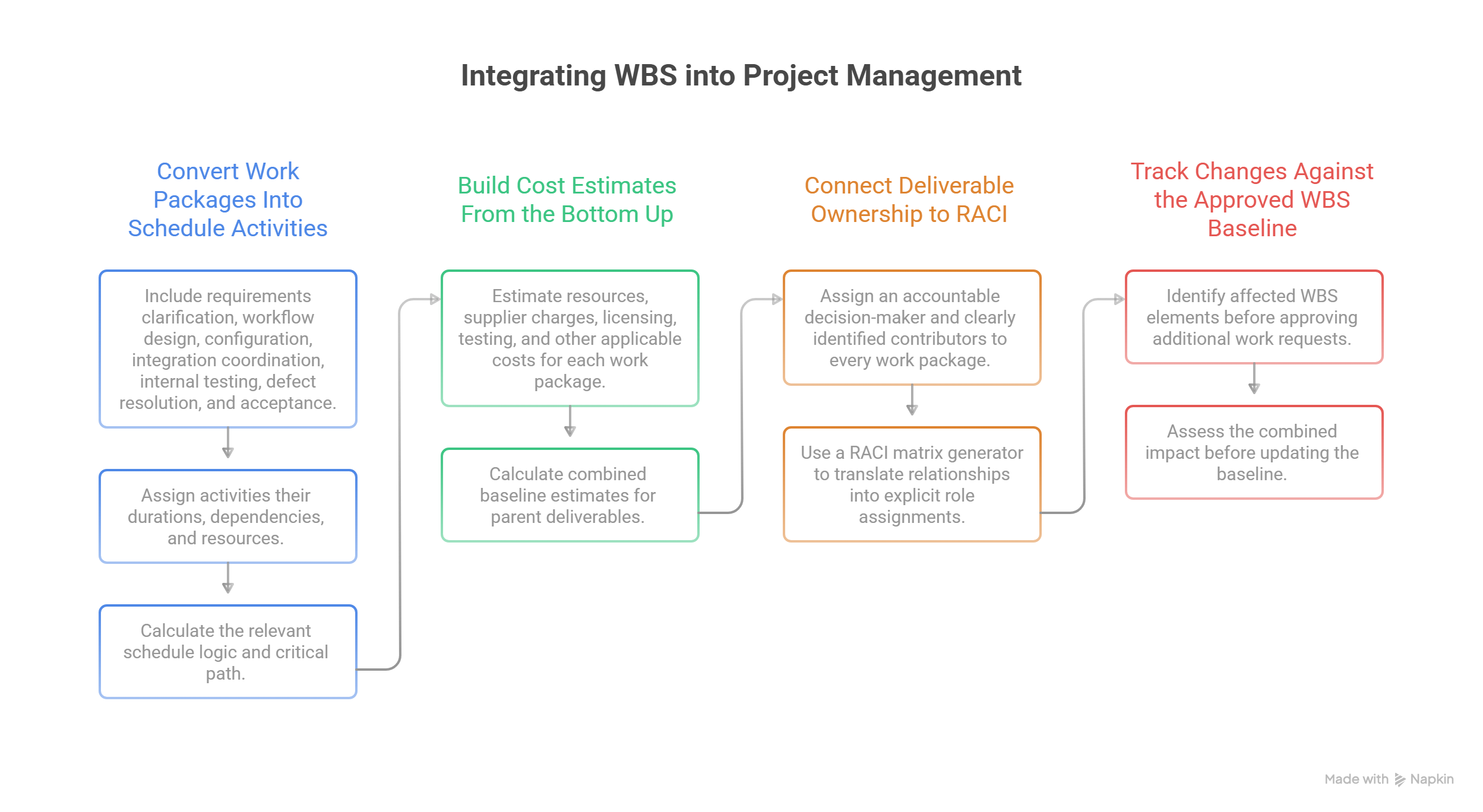
Convert Work Packages Into Schedule Activities
Take 1.4.3 Service Request Workflow.
Its schedule may include requirements clarification, workflow design, configuration, integration coordination, internal testing, defect resolution, and acceptance.
Assign activities their durations, dependencies, and resources. Then calculate the relevant schedule logic and critical path.
For example, workflow acceptance may depend on completed identity controls and CRM integration. Delays in those dependencies can affect the overall release date even if development of the workflow itself is progressing.
Maintaining the WBS-to-activity relationship supports project performance monitoring, resource responsibility planning, and delivery governance.
Build Cost Estimates From the Bottom Up
Estimate the resources, supplier charges, licensing, testing, and other applicable costs associated with each work package.
Suppose the five work packages under 1.4 Platform and Integration Deliverables have illustrative estimates of $18,000, $30,000, $24,000, $28,000, and $10,000.
Their combined baseline estimate is $110,000, assuming these are non-overlapping amounts and any applicable reserves are handled separately.
This calculation supports financial rollups from work package to parent deliverable and eventually to the total project budget.
As delivery progresses, connect progress measurement to earned value indicators, predictive analytics methods, and executive performance reporting.
Connect Deliverable Ownership to RACI
Every work package should have an accountable decision-maker and clearly identified contributors.
For 1.4.3, the product owner may be accountable for acceptance, engineering may be responsible for implementation, security may be consulted on access controls, and operations may be informed about deployment readiness.
The RACI matrix generator can translate these relationships into explicit role assignments.
This helps prevent situations where several teams assume another group owns integration, testing, documentation, or final approval.
For larger initiatives, combine work package ownership with program governance and organizational delivery accountability.
Track Changes Against the Approved WBS Baseline
When stakeholders request additional work, identify the affected WBS elements before approving the change.
A request for multilingual portal support could affect requirements, interface design, workflow implementation, testing, training, and operational documentation.
Assess the combined impact before updating the baseline.
This method supports project governance controls, software integration planning, and financial forecasting.
5. Common WBS Mistakes and a Practical Quality-Control Checklist
A WBS can look complete while still containing structural problems that distort estimates, responsibilities, and progress reporting.
The most effective quality review focuses on scope coverage, deliverable boundaries, acceptance evidence, and the relationship between the WBS and other project controls.
Mistake 1: Organizing Everything Around Project Phases
A phase-only structure can obscure the products and results being delivered.
Use deliverable-oriented decomposition whenever practical. The same deliverable may require work across design, implementation, and testing phases, while the schedule can sequence the underlying activities separately.
This is particularly useful in Agile transformations, enterprise technology delivery, and program management.
Mistake 2: Omitting Project Management and Transition Work
Teams often estimate product development while overlooking governance deliverables, training, security assurance, operational handover, and closure requirements.
These omissions create unexpected costs near the end of the project.
Reconcile the WBS with the scope statement, contracts, regulatory obligations, and project planning templates.
For technology projects, inspect cybersecurity assurance requirements and support transition obligations carefully.
Mistake 3: Creating Work Packages With Unclear Completion Criteria
Terms such as "system development complete" or "documentation finished" provide inadequate evidence for acceptance.
Define the expected deliverable, measurable conditions, and authorized reviewer.
Use this information to support quality assurance, RACI-based accountability, and project reporting.
Mistake 4: Allowing Scope Overlaps Between Work Packages
Two packages may unintentionally contain the same integration, documentation, or testing work.
This creates duplicated estimates and disagreements over responsibility.
Review sibling packages together, define interface boundaries, and document exclusions.
Where responsibility remains unclear, resolve it through project governance and responsibility mapping.
Mistake 5: Using the Original WBS After Major Scope Changes
New requirements, regulatory obligations, or technical dependencies may alter the approved scope.
Maintain version-controlled WBS records and update related estimates, schedules, and acceptance requirements after authorized changes.
Align updates with project cost management, risk evaluation, and governance approvals.
Five Checks Before Approving the WBS
Before baselining the structure, verify that:
Every approved deliverable and necessary project management output is represented.
Every parent element is fully covered by its child elements.
Work packages have clear boundaries without duplicated scope.
Completion evidence and acceptance authority are defined.
WBS IDs can be traced to estimates, ownership, schedule activities, and approved changes.
These checks strengthen the quality of project management documentation, project forecasting, and executive reporting.
6. FAQs: Work Breakdown Structure Template and WBS Examples
-
A WBS defines and organizes the total approved project scope into manageable components.
It helps establish what must be delivered, how scope is grouped, and which packages require estimates, responsibilities, and acceptance criteria.
The WBS also provides a foundation for project scheduling, cost management, and resource accountability.
-
The WBS describes the deliverables and associated work required by the approved scope. The schedule identifies the activities, dependencies, durations, and dates needed to complete that work.
A work package may contain several schedule activities.
For example, an approved customer portal design is a deliverable, while preparing wireframes and conducting design reviews are activities supporting that deliverable.
Use project planning templates alongside critical path analysis to manage both structures.
-
The appropriate number depends on project complexity, scope uncertainty, and reporting requirements.
A relatively small project may use three levels. A large engineering or transformation program may require additional levels to organize complex deliverables.
Stop decomposing when the work packages can be meaningfully estimated, assigned, monitored, and accepted.
Use program management practices and governance planning when determining the appropriate structure.
-
The 8/80 rule is a common estimation guideline suggesting work packages may be sized between eight and eighty hours.
It is a heuristic rather than a mandatory PMI requirement.
Actual package size depends on complexity, risk, uncertainty, reporting needs, and control requirements.
A specialized engineering deliverable may require a different level of decomposition from a routine administrative package. Use cost estimation methods and project planning tools to determine useful package boundaries.
-
A WBS dictionary should explain what each work package means and how its completion will be verified.
Useful fields include WBS ID, description, included work, exclusions, acceptance criteria, owner, dependencies, assumptions, estimated resources, and relevant approvals.
The dictionary supports communication across engineering, procurement, operations, and project management.
Connect it to your RACI matrix, project governance records, and management templates.
-
Yes. A WBS can organize overall deliverables, contractual scope, release outcomes, and required governance work in Agile or hybrid environments.
Detailed delivery planning may remain in product backlogs, user stories, and iterative workflows.
The WBS provides a higher-level scope reference where useful, while Agile artifacts manage evolving implementation details.
This approach complements Agile project management, traditional-to-Agile transitions, and large-scale Agile practices.
